Akinda API Reference
Shariah Compliance API Documentation
Integrate Akinda's proprietary Shariah compliance data into your application. Five stock endpoints and six ETF endpoints, all REST over HTTPS, returning JSON and authenticated with a single API key.
Need to know what is in scope first? Stocks list has every covered market and a downloadable ticker file for each one — the same universe these endpoints answer from, ready to drop straight into a script.
Authentication
Universal Endpoint URL
https://b2b-api.akinda.io/api/v1/{api_endpoint}/{ticker}?apikey={api_key}Substitute {api_endpoint} with one of compliance, basic-report, full-report, or methodology; {ticker} with an uppercase stock symbol (e.g. AAPL); and {api_key} with your Akinda API key from the API Keys dashboard.
The ETF endpoints have paths of their own, with a fund symbol where one is needed: /etf/{symbol}, /etf/{symbol}/holdings, /etf/{symbol}/screening, /etf/list, /etf/screener and /etf/compare.
?apikey=YOUR_KEY | Header: X-API-Key: YOUR_KEYRate Limits & Bandwidth
| Tier | Rate | Bandwidth | Endpoints |
|---|---|---|---|
| Basic Free | 10 / day | 100 MB / mo | /compliance |
| Personal Standard | 300 / min | 10 GB / mo | /compliance/basic-report |
| Personal Ultimate | 1,000 / min | 100 GB / mo | /compliance/basic-report/full-report |
| Business Standard | 1,000 / min | 100 GB / mo | /compliance/basic-report/full-report |
| Business Ultimate | 3,000 / min | 300 GB / mo | /compliance/basic-report/full-report/methodology/verdict-changes/etf/{symbol}/etf/{symbol}/holdings/etf/{symbol}/screening/etf/list/etf/screener/etf/compare |
| Business Enterprise | Unlimited | Unlimited | All endpoints |
Cursors and seq
Four of the five stock endpoints answer a question about one ticker. /verdict-changes is different: it is a feed, and you read it the way you read a log — from where you left off.
Every event in that feed carries a seq — a plain, ever-increasing integer, assigned in the order events happened. It is not a date and not a ticker count. It is a position in the log, like a line number. Event 131 simply happened after event 130.
That is what a cursor is: the seq you have already read up to. Each response hands you one back as next_cursor. Send it as since on your next call and you get everything that has happened in between — nothing repeated, nothing skipped.
Two things worth knowing. seq is not contiguous — gaps are normal and mean nothing, so never assume seq + 1 is the next event or do arithmetic on the difference. And rows are never rewritten and never renumbered, which is what lets you replay the whole feed from oldest_seq and rebuild a mirror from scratch rather than re-fetching every ticker.
License and Usage
Personal Use License
For individual developers, students, and personal research projects. Bundled with every Personal-tier plan (Basic, Standard, Ultimate).
- Use in non-commercial apps, dashboards, and scripts.
- No attribution required.
- You may not redistribute the raw response data as a competing dataset.
Commercial Use License
For companies embedding Akinda data inside a product, paid SaaS, or B2B integration. Bundled with every Business-tier plan (Standard, Ultimate, Enterprise).
- Required for any monetised app, paid feature, or partner integration.
- Enterprise customers can negotiate custom SLA, dedicated support, and multi-country market access.
- Contact contact@akinda.io for redistribution rights.
Use Cases
Shariah stock screener API
Call /compliance across your universe and filter on halal_status, so only Shariah-compliant stocks surface in your screener or watchlist. For funds, /etf/screener does the filtering server-side in one call.
Halal / haram badges in a finance app
Hit /compliance on every quote render to attach a real-time status badge next to each ticker.
Purification calculations
Use non_compliant_revenue_perc and the dollar counterparts to compute the exact purification amount for portfolio holdings.
Institutional compliance audits
Pull full reports across a portfolio nightly; flag any ticker whose ratios cross the AAOIFI thresholds.
Multi-country tickers
The Akinda API audits four markets today — United States, United Kingdom, Canada and Uzbekistan. Country is auto-detected from the ticker, so you never pass a country parameter on the per-ticker path. The response carries the matching listing_country (ISO-2) and reporting_currency (ISO-4217) fields so downstream code can format dollar amounts in the company's native currency. No FX conversion ever happens — every numeric field is denominated in reporting_currency.
| Country | Ticker format | Exchange | listing_country | reporting_currency |
|---|---|---|---|---|
 United States United States | AAPL (no suffix) | NYSE, NASDAQ, AMEX and OTC | "US" | "USD" |
 United Kingdom United Kingdom | AZN.L (.L suffix) | LSE | "GB" | "GBP" |
 Canada Canada | RY.TO (.TO suffix) | TSX, TSX Venture | "CA" | "CAD" |
 Uzbekistan Uzbekistan | UTGA.UZ (.UZ suffix) | UZSE | "UZ" | "UZS" |
Coverage launched with the 2026-06-15 Coverage Expansion release (LSE-UK ~355 names + TSX-Canada ~72 names). Live uptime and per-endpoint coverage stats are on /developer/docs/status — those numbers come straight from the backend and update in real time, never from a static cache. Additional markets are tracked on the Roadmap.
MCP Server
Connect Claude to Akinda's Shariah screening and ask in plain language — check compliance, pull reports, screen a portfolio, or calculate purification without leaving the chat. Each tool call is a metered API request on your plan.
Who can connect
The MCP Server is available on paid plans only. A free plan can sign in, but its tool calls return an upgrade message until you move to a paid plan.
Plans that can connect
- Personal Standard
- Personal Ultimate
- Business Standard
- Business Ultimate
- Business Enterprise (and legacy Enterprise)
Basic (Free) — blocked
MCP access requires a paid Akinda plan. Upgrade at b2b.akinda.io/pricing to connect your AI tools.
403 mcp_not_enabled_on_planThe five tools
Each tool call counts as one metered API request and is gated by the same tier rules as the matching REST endpoint. Verdicts are HALAL, NOT HALAL, DOUBTFUL, or a no-verdict “no data” state (ERROR_DATA / INCOMPLETE_DATA — not a haram signal). Markets: US, UK (.L), Canada (.TO) and Uzbekistan (.UZ), reported in each company's native currency with no FX conversion.
| Tool | What it returns | Minimum plan |
|---|---|---|
akinda_check_compliance | Shariah verdict for a single ticker | Any paid plan |
akinda_basic_report | Verdict + the three core AAOIFI ratios | Personal Standard + |
akinda_full_report | Full report incl. AI-extracted figures + $ values | Personal Ultimate + |
akinda_screen_portfolio | Verdict for a list of tickers | Any paid plan |
akinda_calculate_purification | Dividend purification amount | Personal Standard + |
Connector URL
https://b2b-api.akinda.io/mcpAdd this as a custom MCP connector, then connect your client. Transport is Streamable HTTP over POST.
Connect your client
Three clients are verified. ChatGPT is sign-in only, Cursor is easiest with a key, and Claude does either. Sign in with the email your subscription is under — a free plan can sign in, but tool calls return an upgrade message until you're on a paid plan.
| Client | How it connects | Where |
|---|---|---|
| Claude | Sign in with Google, or an API key | claude.ai, Claude Desktop, Claude Code |
| ChatGPT | Sign in with Google onlyIt cannot send a custom API-key header. | Pro, Plus, Business, Enterprise, Education — Settings → Connectors |
| Cursor | An API key in mcp.json, or sign in with Google | project .cursor/mcp.json, or global ~/.cursor/mcp.json |
Claude — sign in with Google
The screenshots below are the Claude desktop app, and claude.ai in the browser is the same dialog. Claude Code connects from the terminal with claude mcp add rather than this dialog. ChatGPT uses the same Google sign-in by a different route, and has its own walkthrough below.
- 1
Open your profile in Claude
In the Claude desktop app, click your profile at the bottom-left of the sidebar.
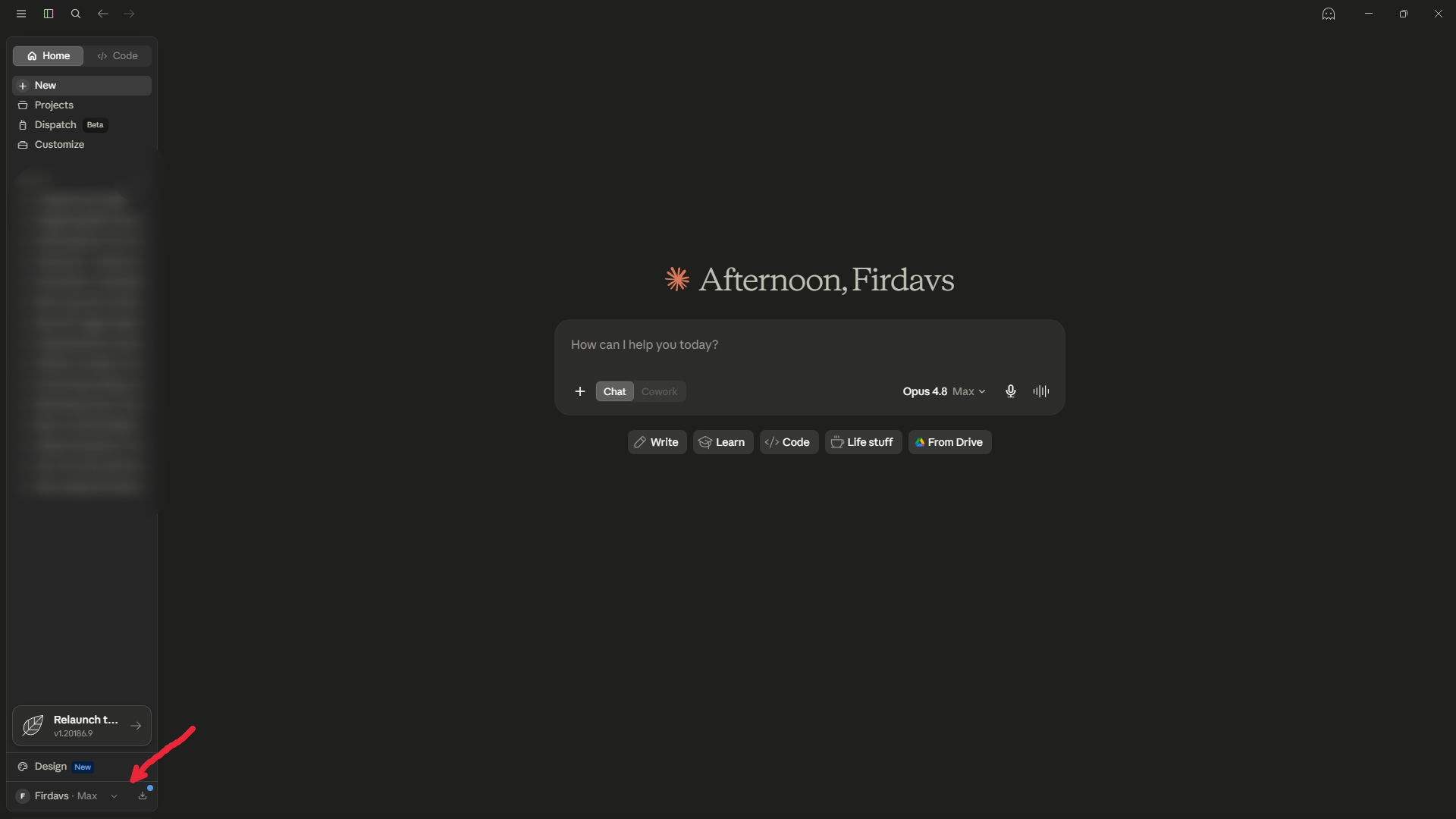
Show the full step-by-step — 9 more steps, with screenshots▾
- 2
Open Settings
Click Settings — or just press Ctrl + ,.
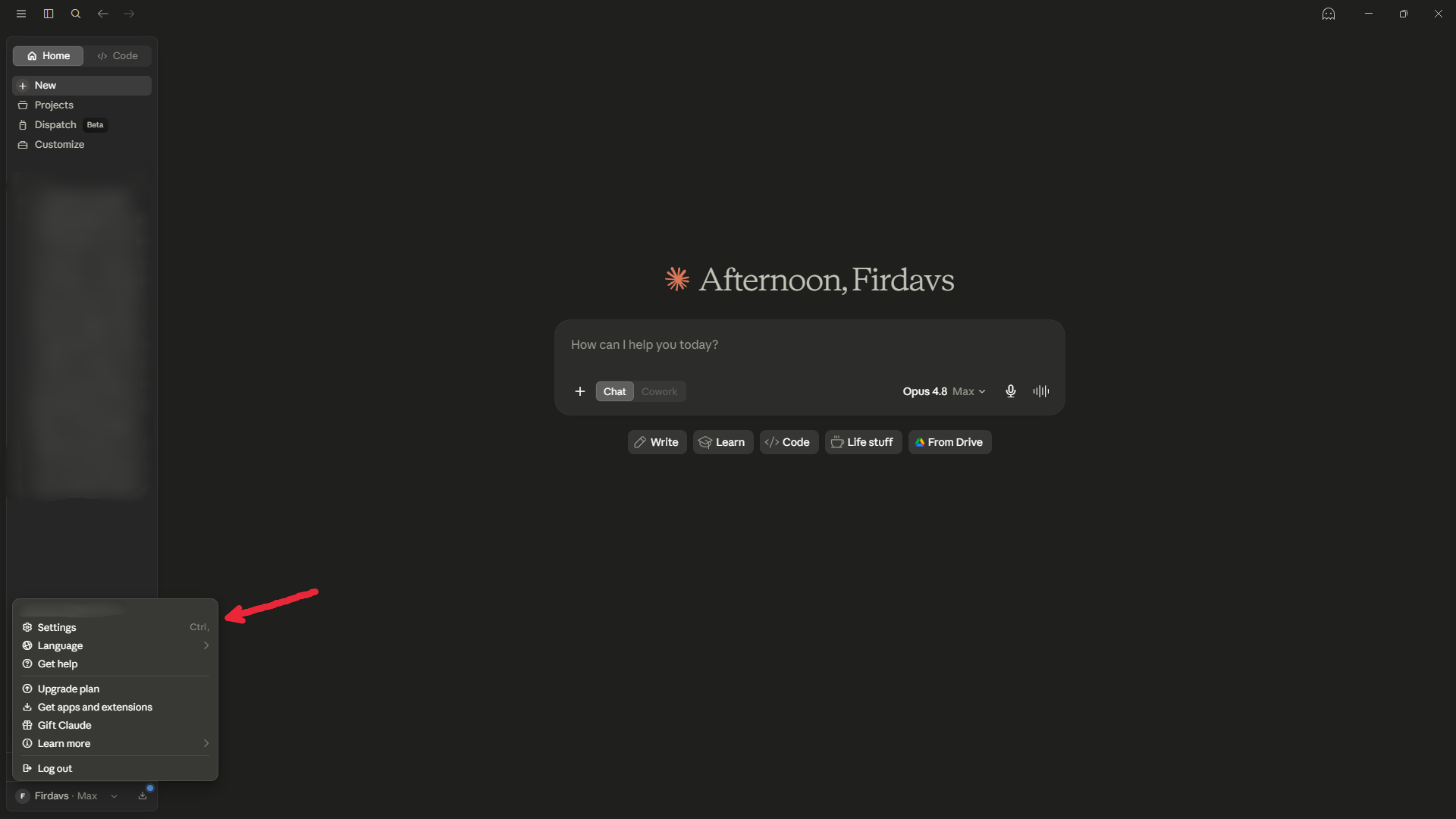
- 3
Go to Connectors
In the Settings window, scroll the left menu down to Connectors and open it.
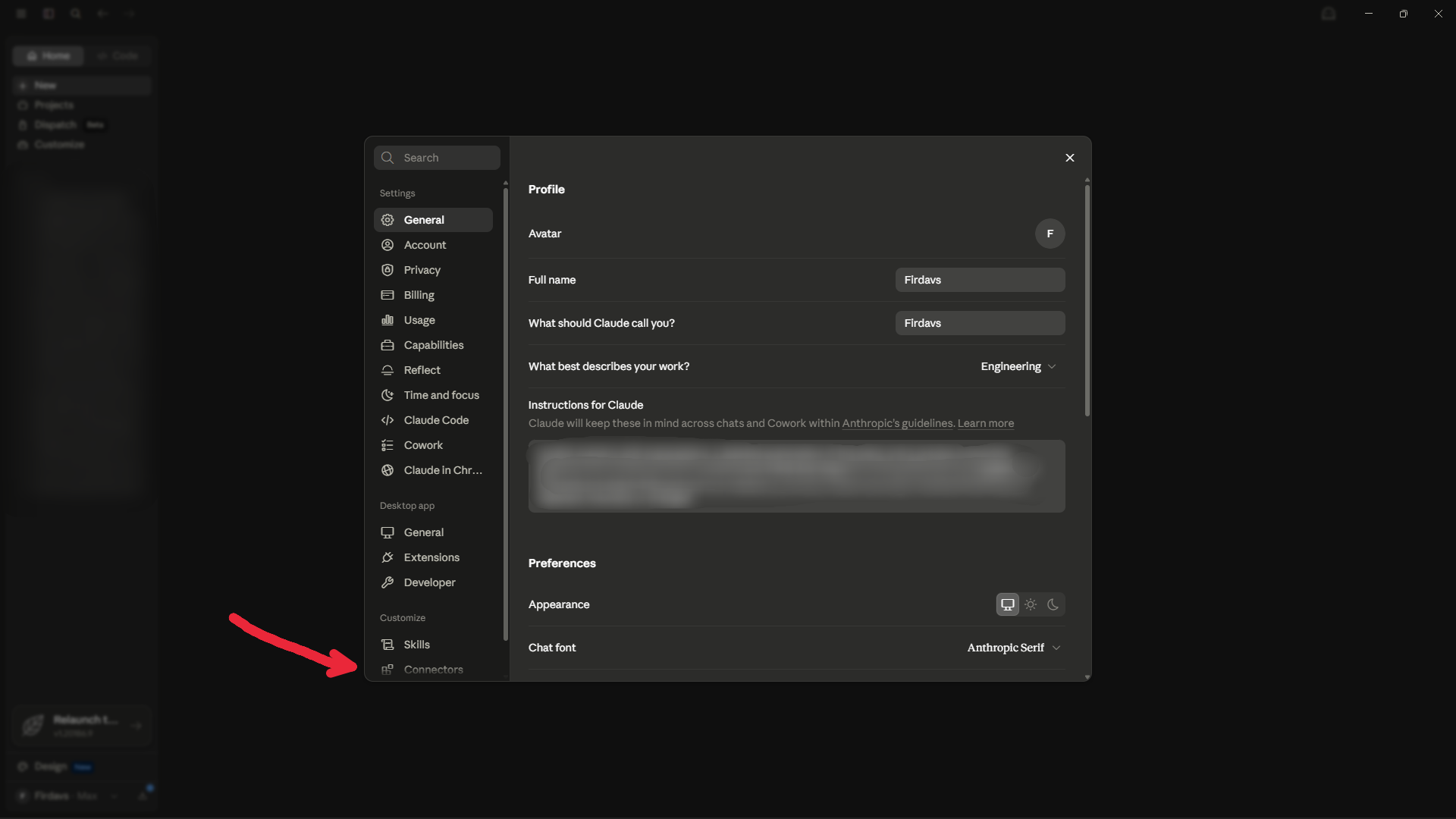
- 4
Click Add
At the top-right of the Connectors panel, click the Add dropdown.
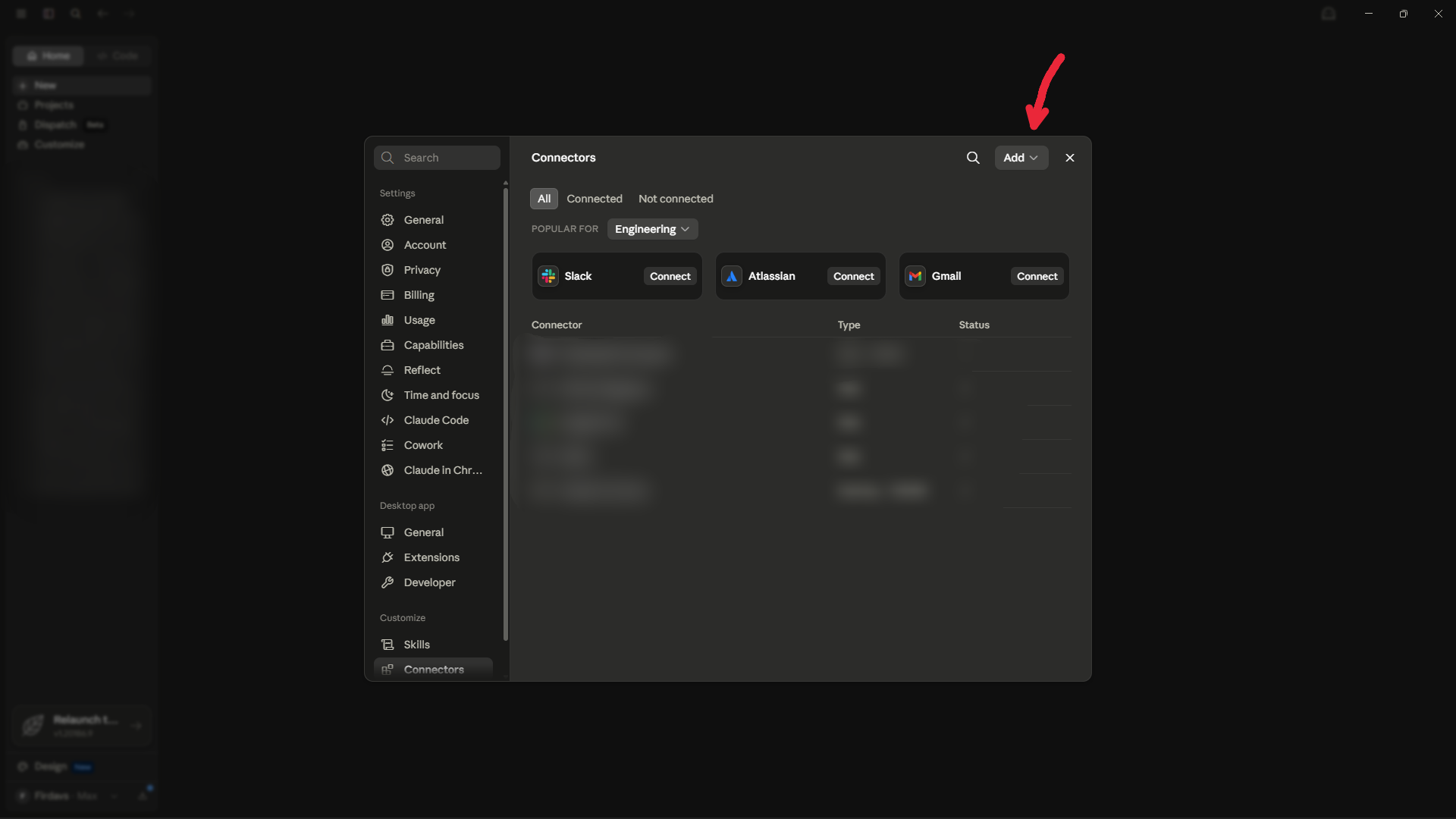
- 5
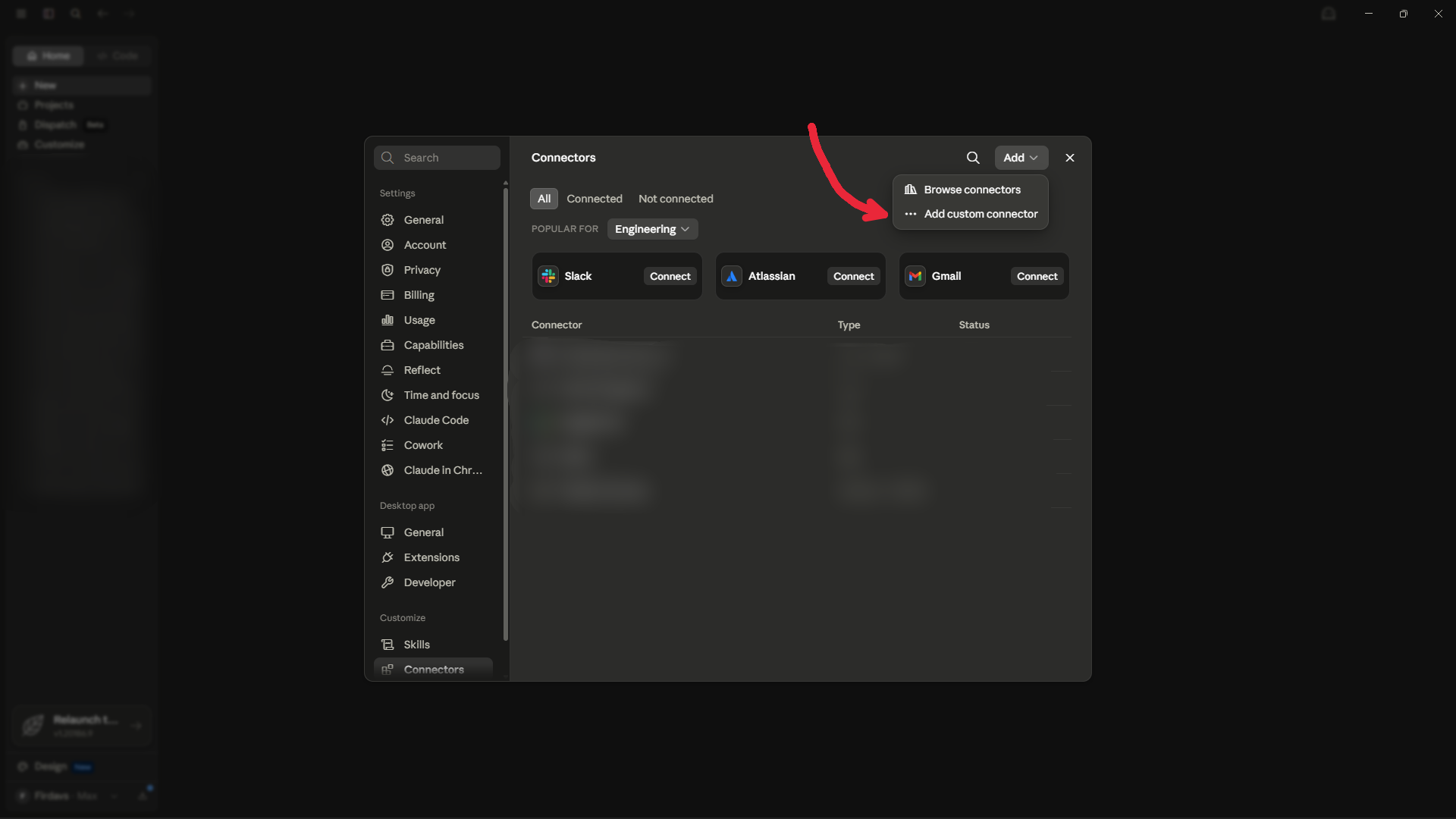
Choose Add custom connector
In the dropdown, click Add custom connector.
- 6
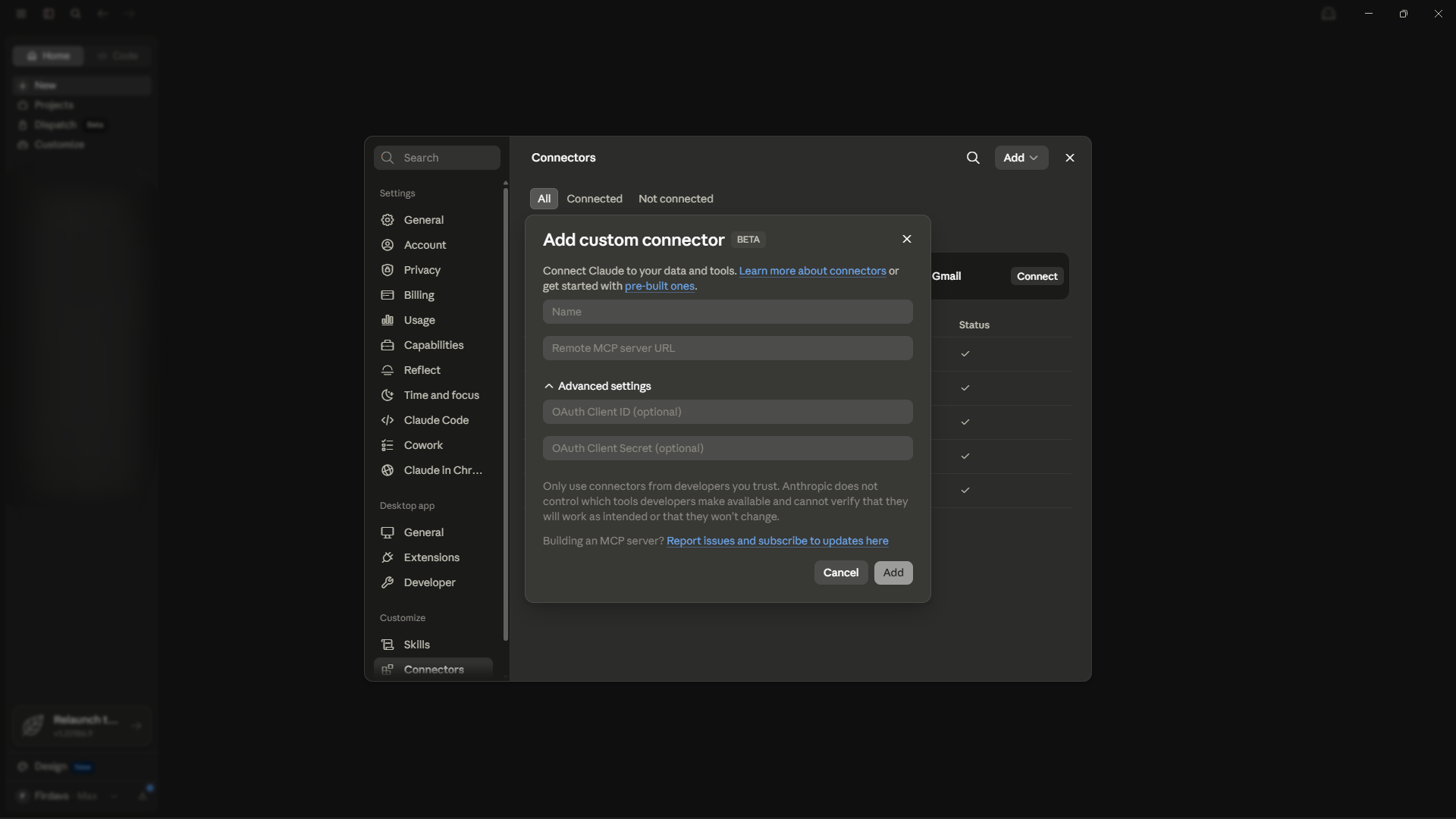
The dialog opens
You'll see two fields — a Name and a Remote MCP server URL. Leave Advanced settings empty — Claude registers itself automatically.
- 7
Enter the name and the URL
Give it a name — e.g. Akinda MCP — and paste this into Remote MCP server URL:
https://b2b-api.akinda.io/mcp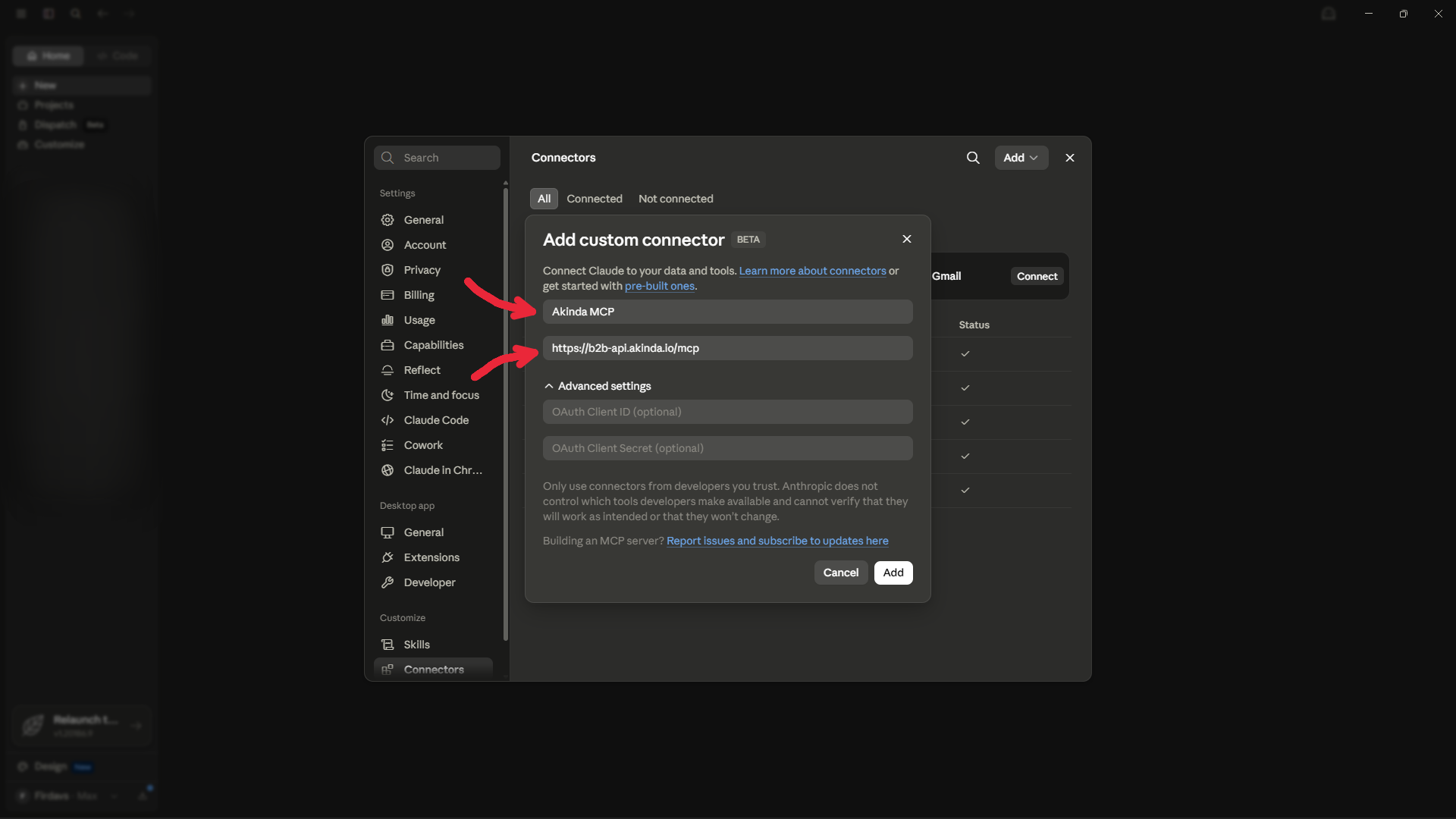
- 8
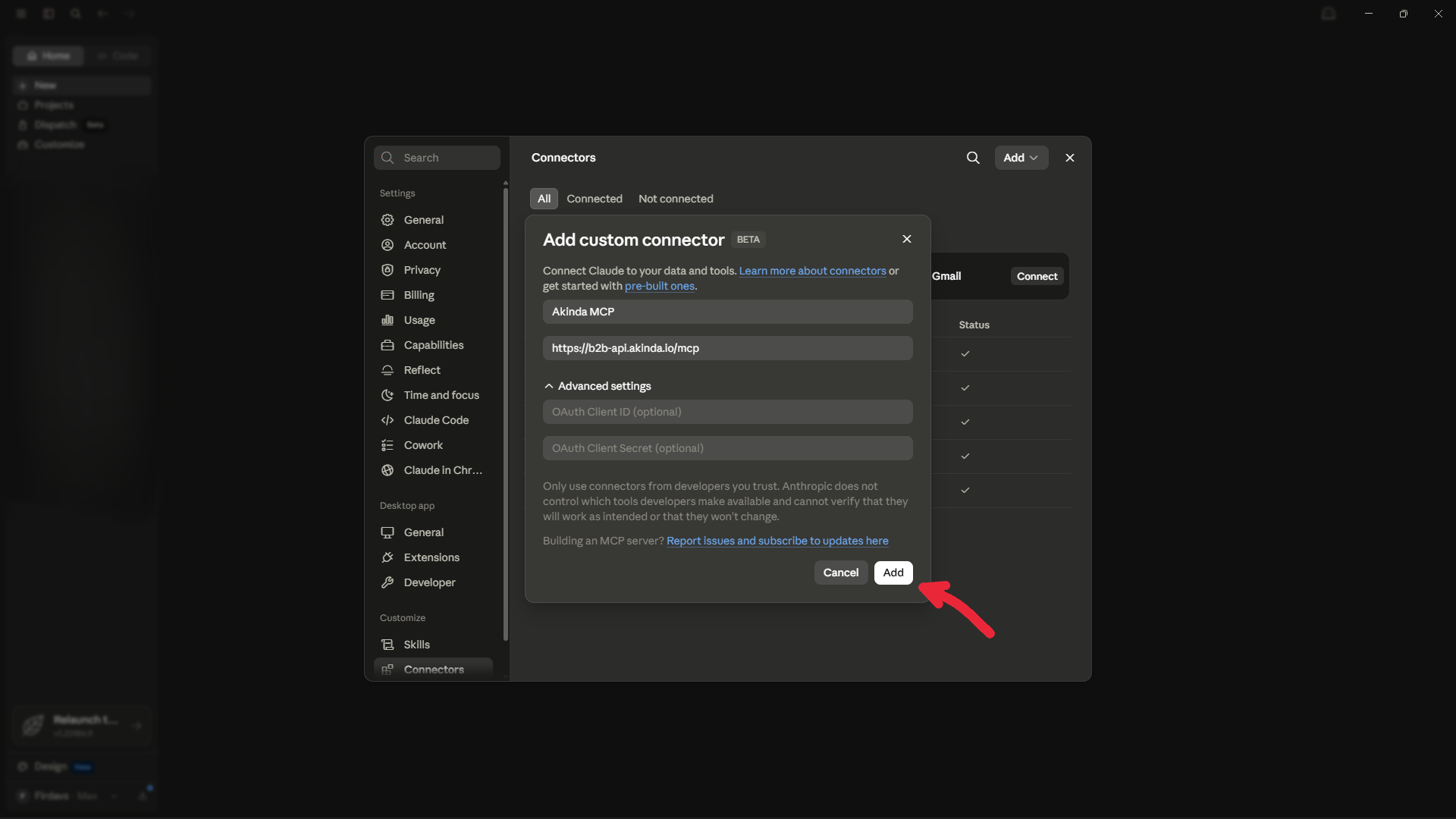
Click Add
Click Add to save the connector.
- 9
Connect and sign in with Google
Find Akinda MCP in your connectors and click Connect. A browser tab opens — choose the Google account on your Akinda subscription (the paid account you already use), approve, and it returns to Claude. Akinda never sees your Google password.
- 10
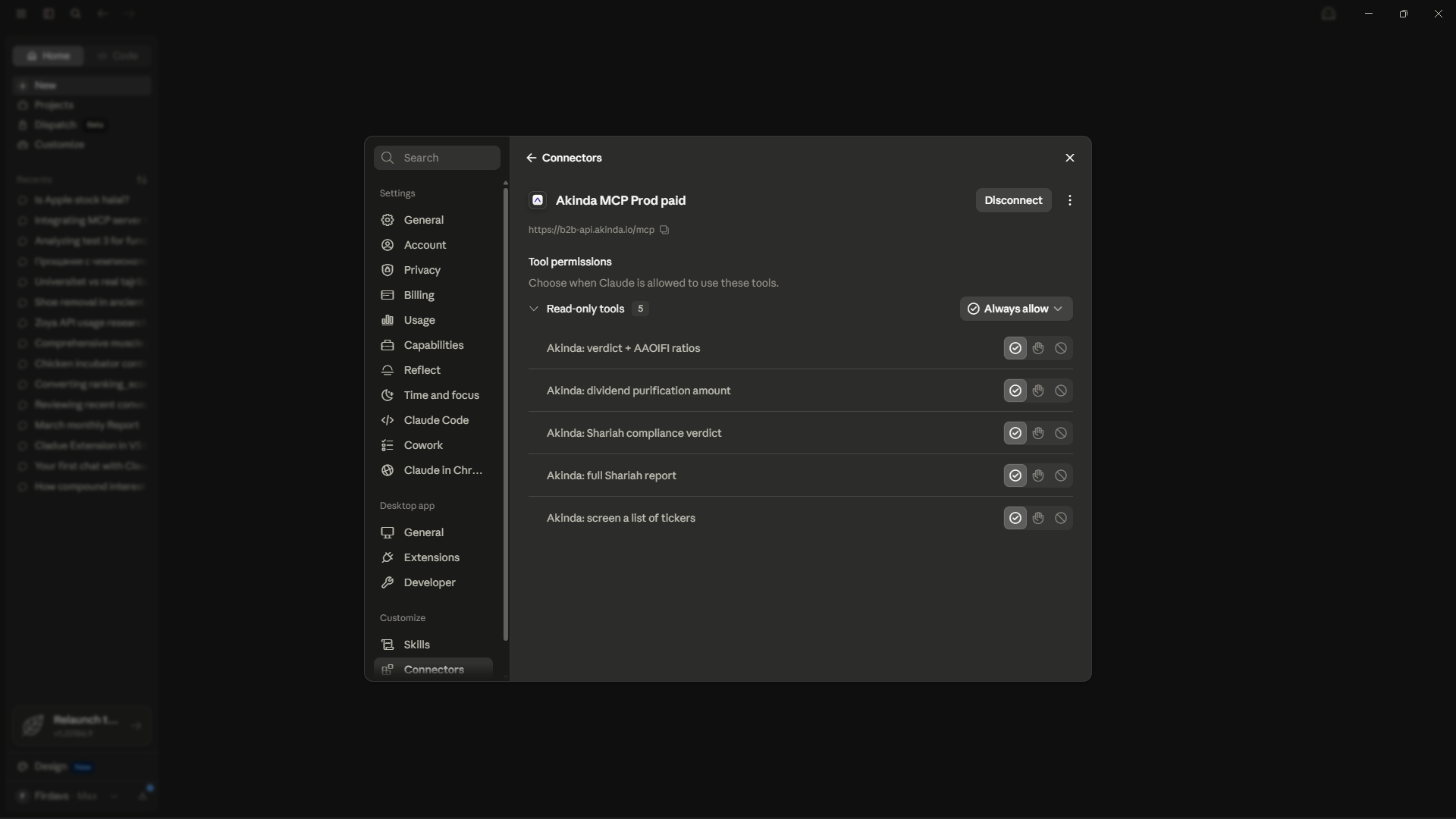
Done — the tools are ready
Claude now shows Akinda connected with its five read-only tools. Ask something like “Is AAPL halal?” and Claude will use them.
ChatGPT — sign in with Google
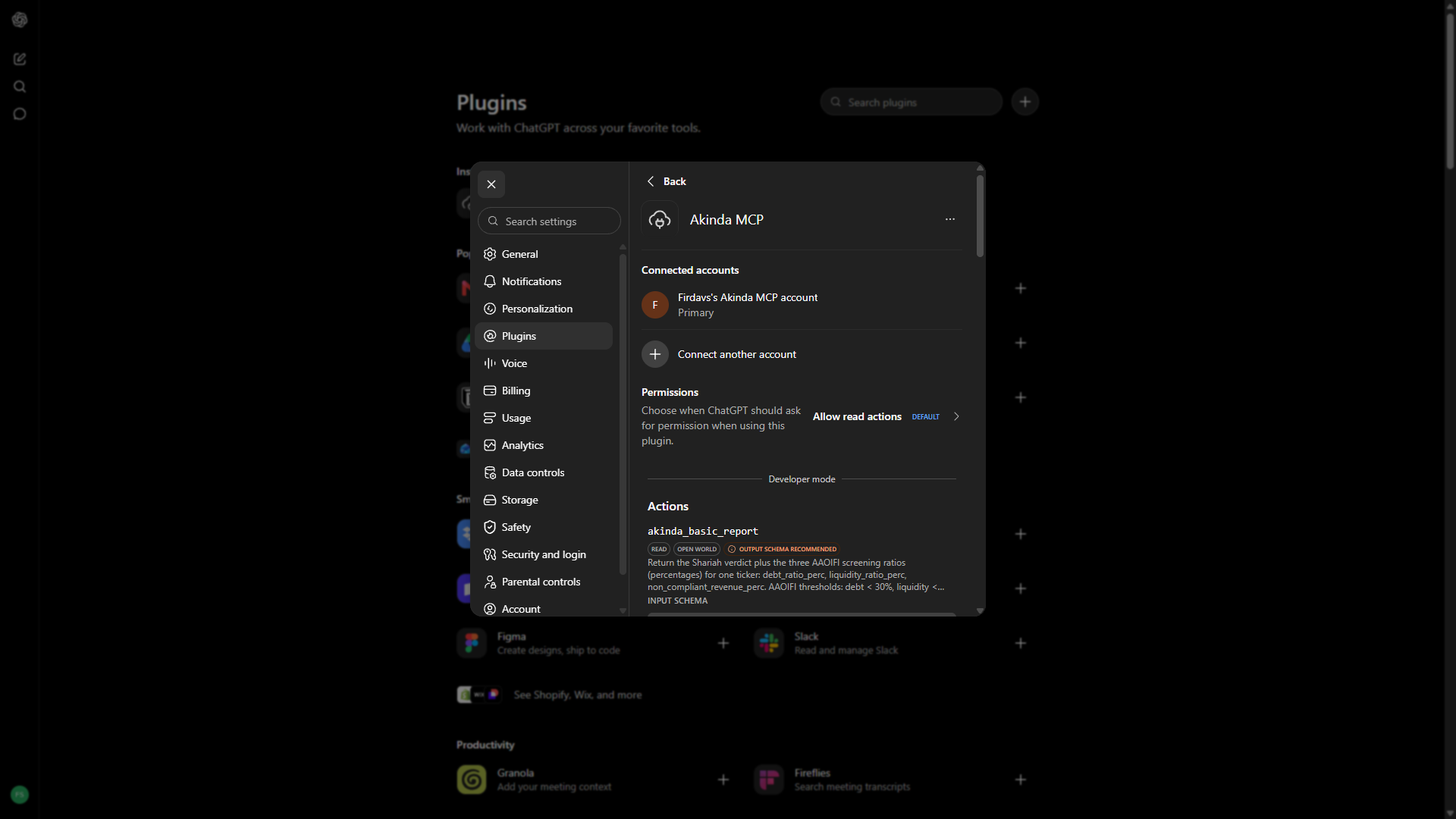
The same Google sign-in, reached through Settings → Plugins rather than Connectors, and with Developer mode switched on first under Security and login — ChatGPT will not take a custom MCP server without it. Paid plans, and it cannot use an API key at all.
- 1
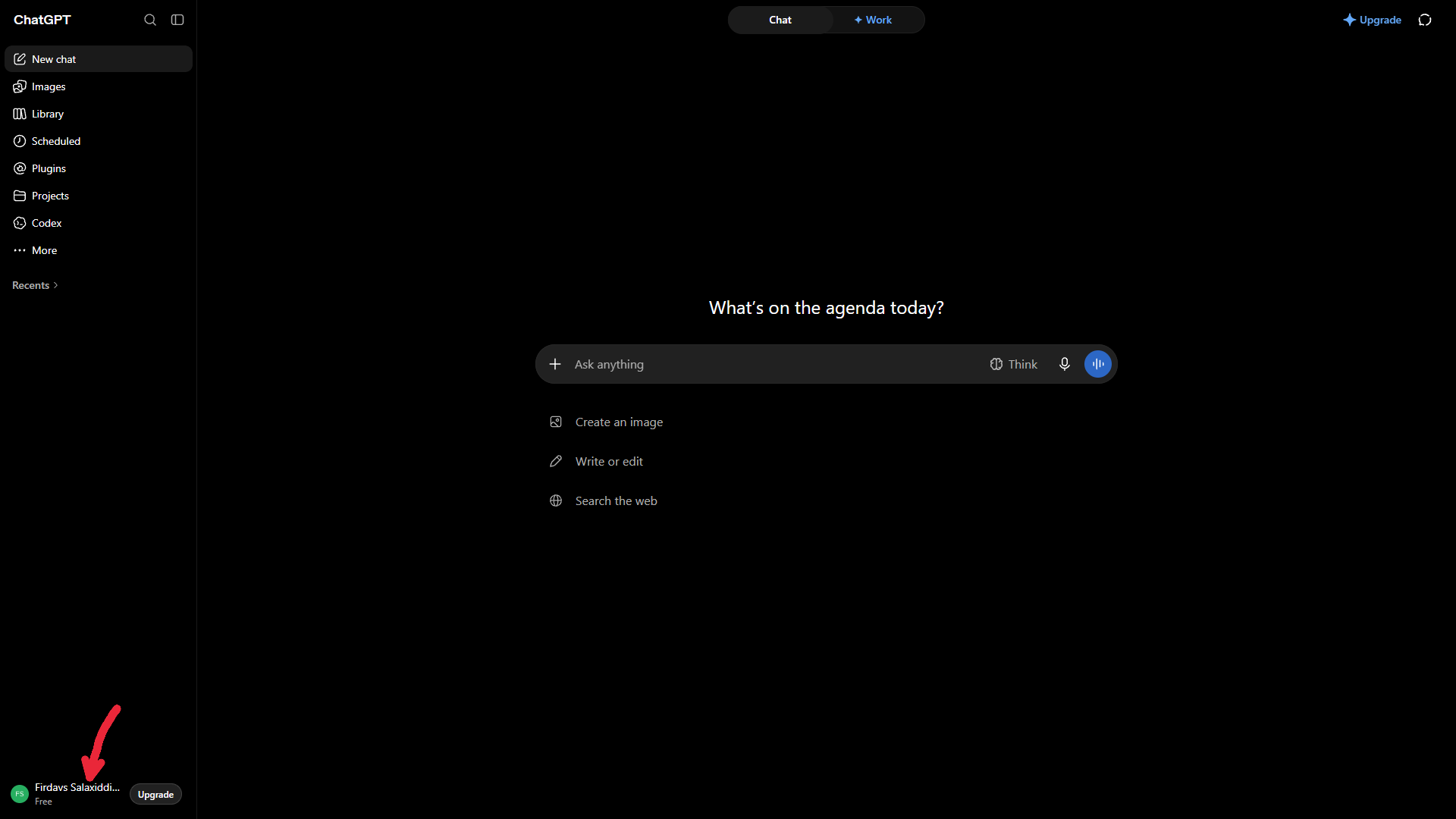
Open your account menu in ChatGPT
Click your name at the bottom-left of the sidebar.
Show the full step-by-step — 7 more steps, with screenshots▾
- 2
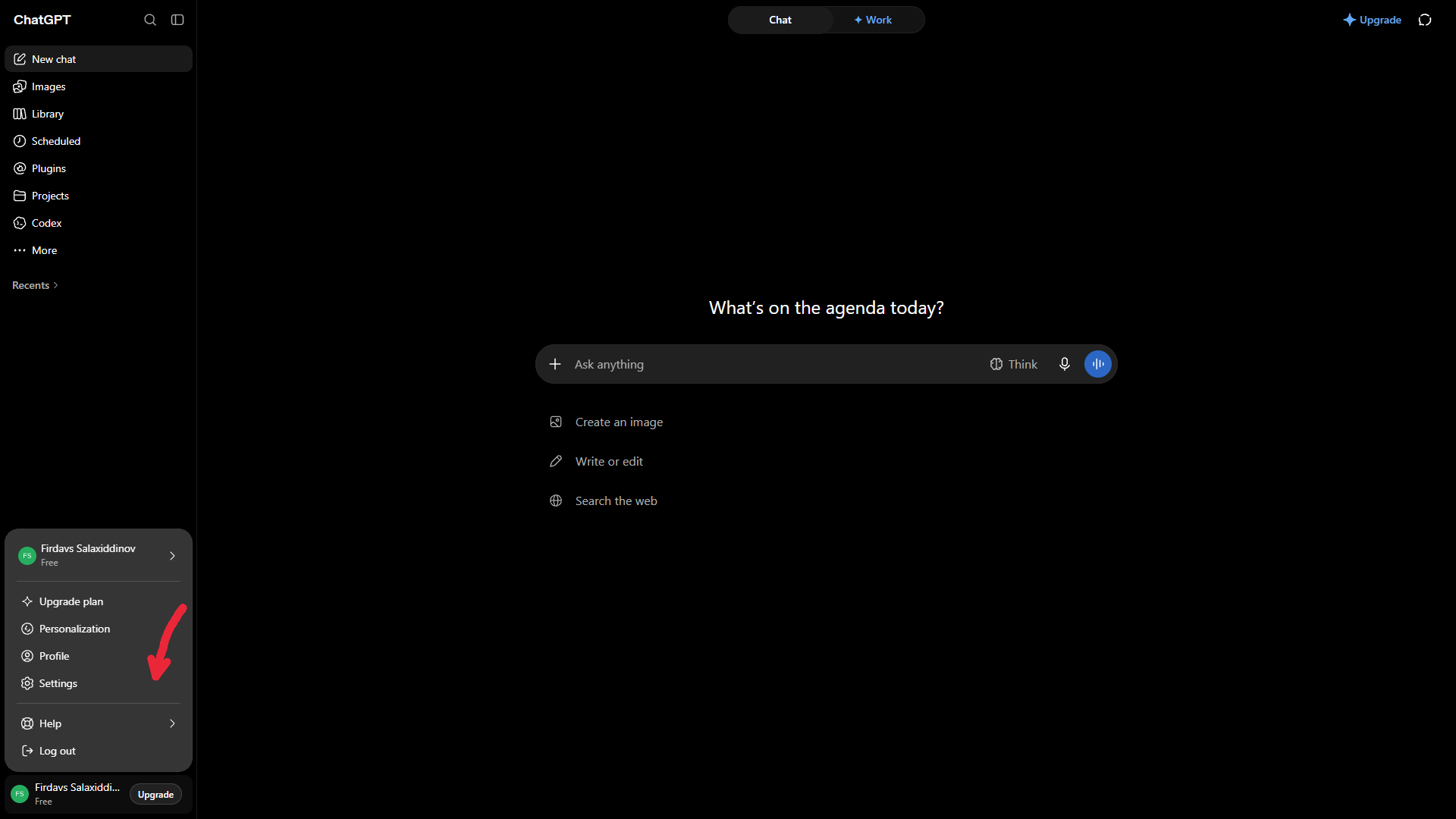
Open Settings
Choose Settings from the menu.
- 3
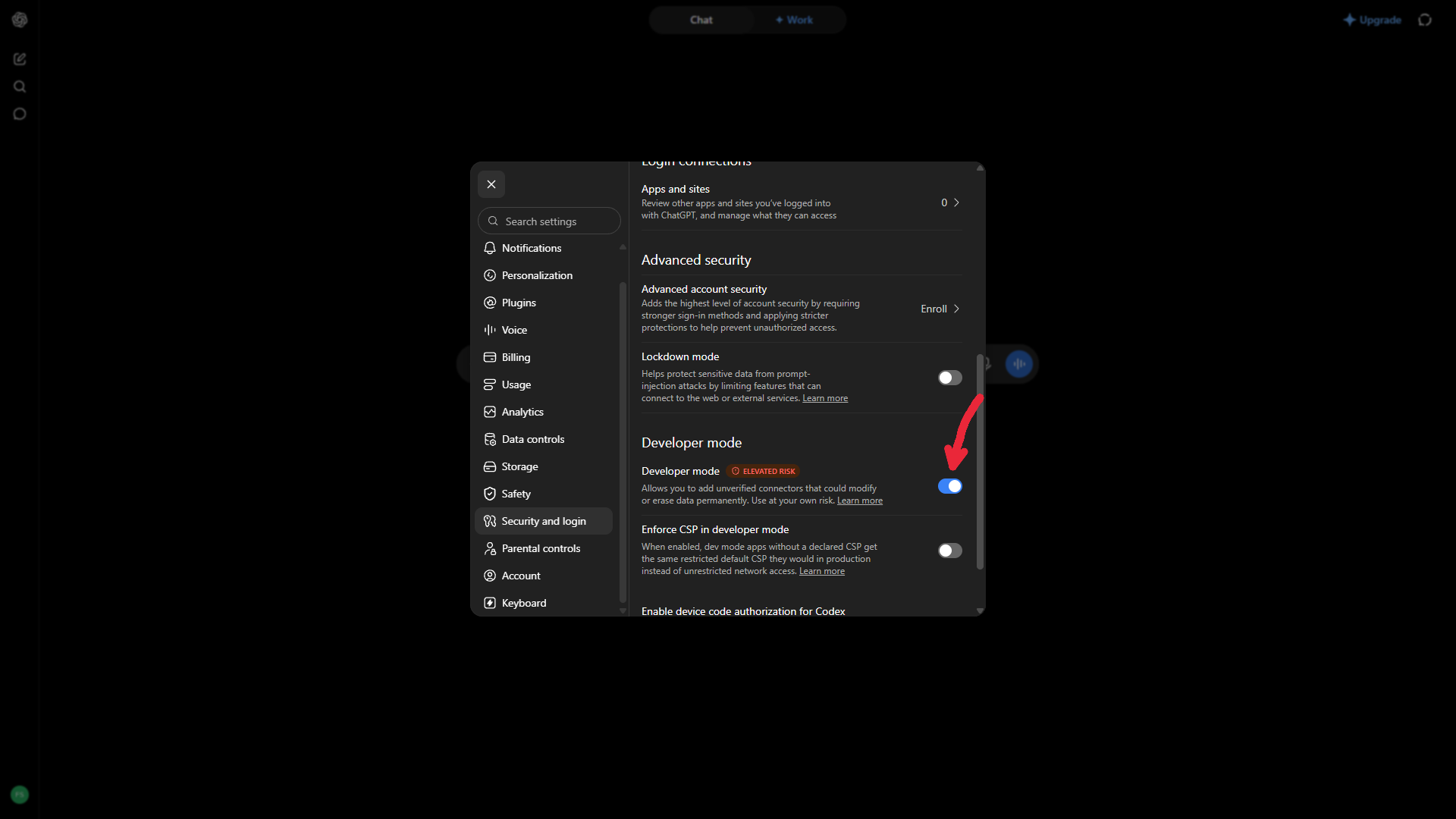
Turn on Developer mode
Open Security and login, scroll to Developer mode and switch it on. ChatGPT will not accept a custom MCP server without it. This step has no equivalent in Claude.
- 4
Go to Plugins
Back in Settings, open Plugins, then Browse plugins.
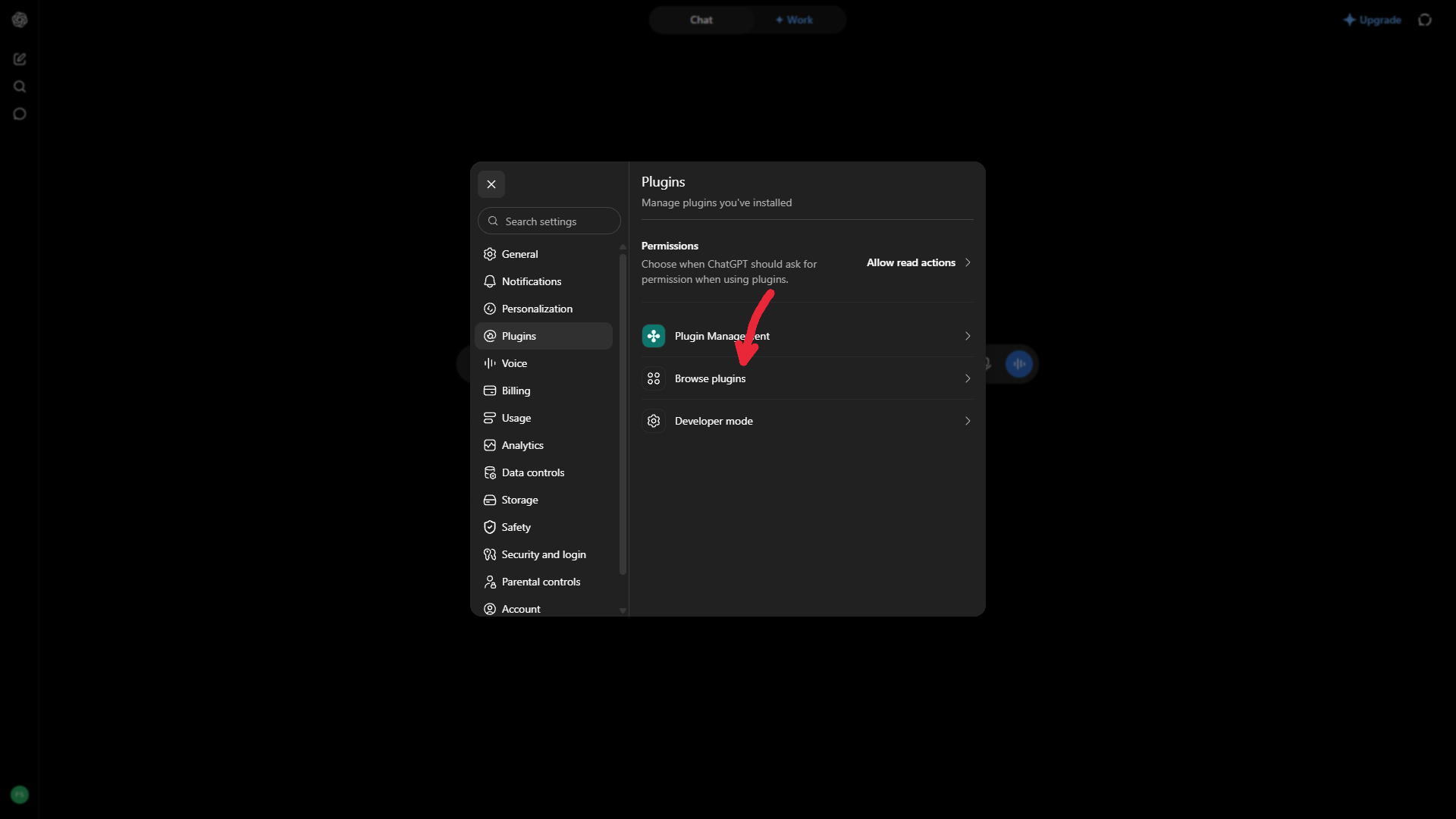
- 5
Add a plugin
On the Plugins page, click the + at the top right.
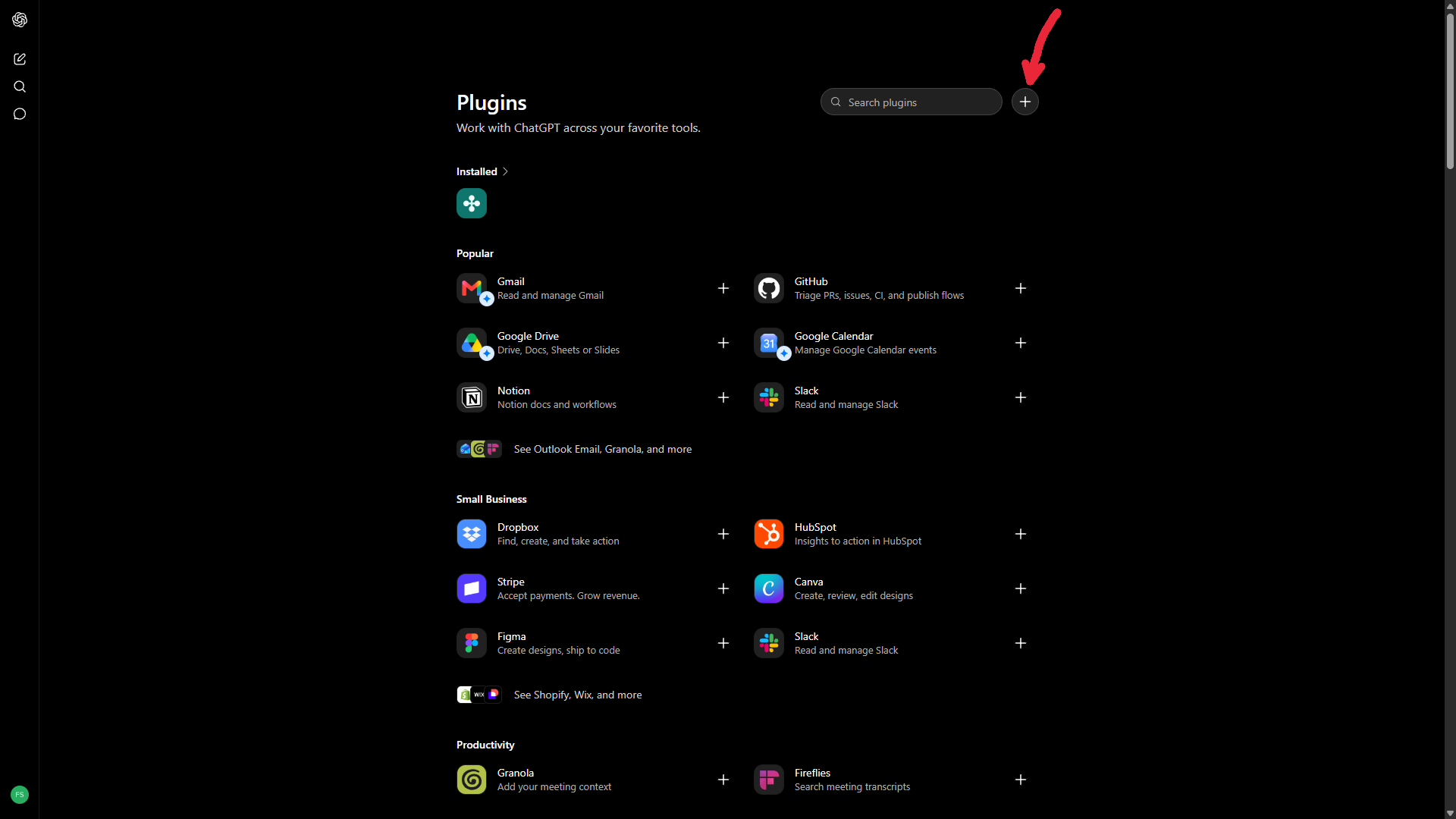
- 6
Enter the connector URL
Name it Akinda MCP. Leave Connection on Server URL and paste
https://b2b-api.akinda.io/mcp. Set Authentication to OAuth, tick I understand and want to continue, then click Create.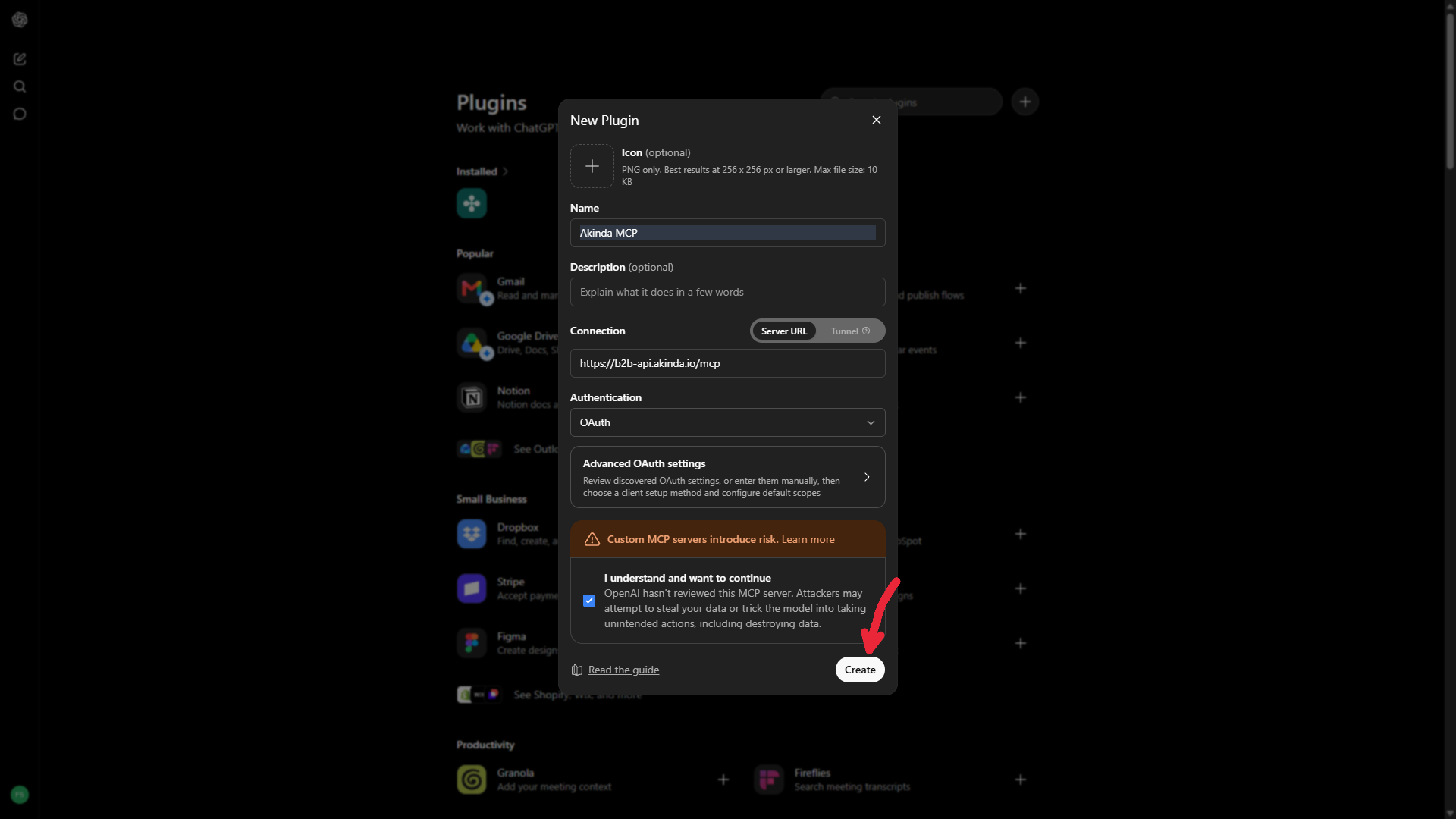
- 7
Sign in with Google
Click Sign in with Akinda MCP and choose the Google account on your Akinda subscription. The picker opens in a browser window, so there is no screenshot of it here — and there is no key to copy. Akinda never sees your Google password.
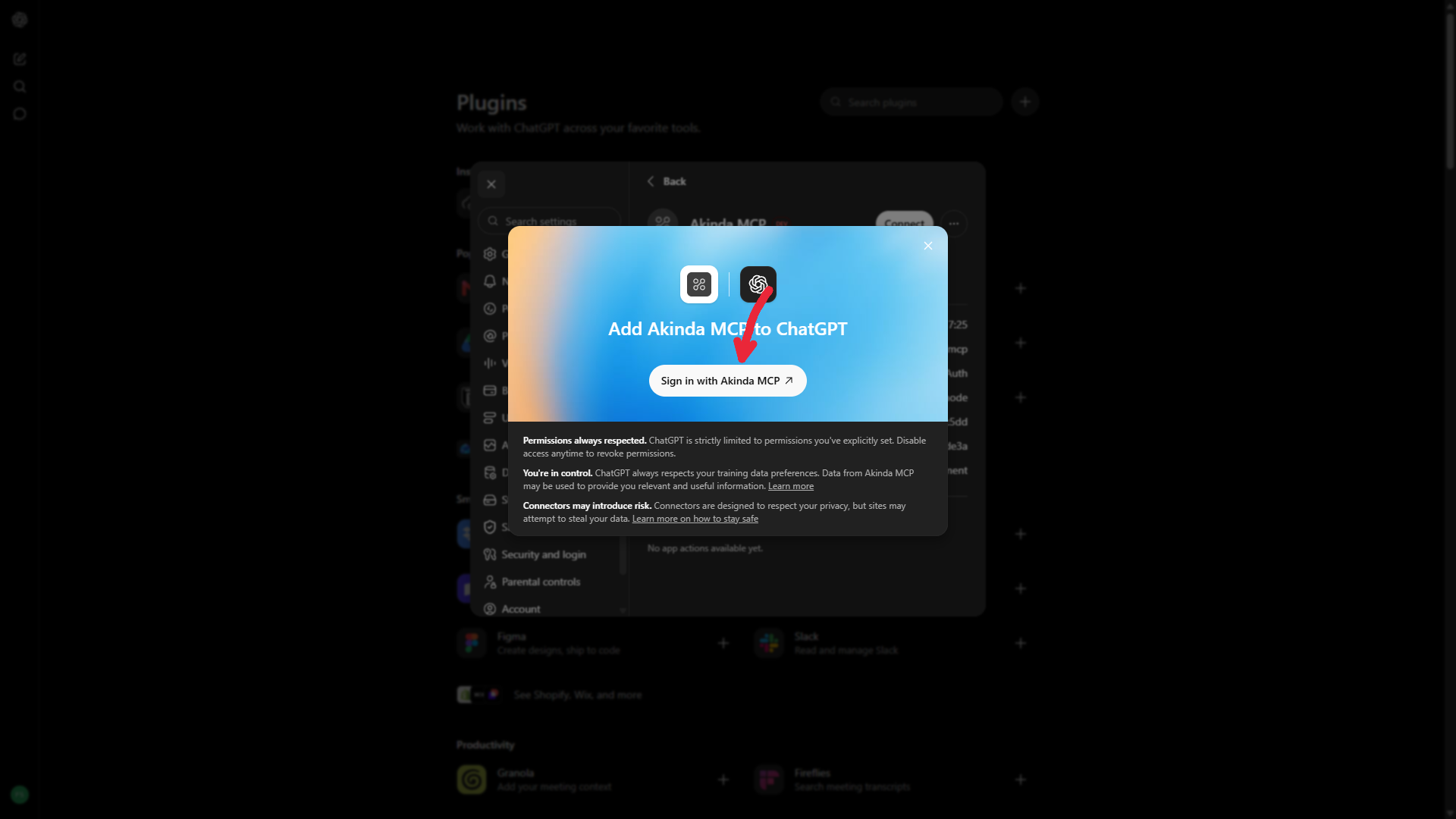
- 8
That is it
Your account appears under Connected accounts and the Akinda actions are listed below it. Ask ChatGPT about a ticker and it will call them.
Cursor
A static header in .cursor/mcp.json (per project) or ~/.cursor/mcp.json (global). This is the path below; Cursor also supports the same Google sign-in the other two clients use.
{
  "mcpServers": {
    "akinda": {
      "url": "https://b2b-api.akinda.io/mcp",
      "headers": { "X-API-Key": "YOUR_AKINDA_API_KEY" }
    }
  }
}
GET returns 405, and that is correct
GET https://b2b-api.akinda.io/mcp answers 405 Method Not Allowed. The MCP specification says a server must answer the optional GET stream with either an SSE stream or 405, and 405 is the prescribed answer for a stateless server — which ours is, so any instance can serve any request with no sticky sessions. Connections are POST only.
If a client reports a connection failure citing 405 or an SSE error, that is the client mishandling an optional stream rather than a fault here. Send us the client and its version instead of working around it.
Disclaimer
Informational screening based on reported financial data. Not a fatwa; does not replace a qualified scholar. Values are in the stock's native currency — never FX-converted.
Webhooks
Requires Business Ultimate or Business Enterprise. Register an HTTPS endpoint and Akinda POSTs a verdict change to it within about a minute of the change being recorded — no polling. Same entitlement as /verdict-changes; a session without it gets 403 insufficient_tier.
One exception to the timing above. When a run moves an unusually large number of stocks at once — a rulebook revising its thresholds, for example — the batch is held for review before it is sent, rather than pushed automatically. Nothing is lost: the events are delivered once released, and an alert that reaches you is one a person has already looked at.
What you receive
The data object is identical to an event from GET /api/v1/verdict-changes, so moving from polling to push needs no parser change. Each entry of changed_statuses_by_methodologies carries status keys suffixed with its own rulebook — new_status_djim, not new_status. Read them off entry.methodology rather than hard-coding five shapes.
{
  "type": "verdict.change",
  "event_seq": 164,
  "delivered": "2026-09-20T03:54:47Z",
  "attempt": 1,
  "replay": true,
  "data": {
    "seq": 164,
    "run_id": "run-2026-09-18",
    "ticker": "NUWE",
    "company_name": "Nuwellis, Inc.",
    "event_type": "verdict.changed",
    "event_class": "verdict",
    "changed_at": "2026-09-18T08:42:49",
    "note": null,
    "changed_statuses_by_methodologies": [
      {
        "methodology": "djim",
        "new_status_djim": "HALAL",
        "old_status_djim": "NOT HALAL"
      },
      {
        "methodology": "sp",
        "new_status_sp": "HALAL",
        "old_status_sp": "NOT HALAL"
      }
    ]
  }
}
A delivered payload is a snapshot, not the final word. When several rulebooks move the same stock in one run we collapse them into a single notification — but if a later one arrives after we have already sent, the webhook you hold is not amended. It stays as delivered. So treat a webhook as “something changed for this ticker” and read GET /api/v1/verdict-changes?since=<seq-1> for the complete, current list of what changed. Nothing is ever lost: the feed is always right.
Registering an endpoint
Up to five active endpoints per account, each with its own URL, signing secret, starting point and delivery history — so a receiver can be moved by running the new one alongside the old and stopping the old one afterwards, rather than by a cutover with a gap in the middle.
| Field | Type | Description |
|---|---|---|
| GET /user/webhooks | session | Every endpoint on the account, active first then newest first, plus the account-wide health figures: count, active, max_active, latest_seq, delivered_30d, failed_30d and per_day. Each row carries its own id, url, state, state_note, start_seq, receiving, and its own delivered_30d and failed_30d — read health PER ENDPOINT from those, never by dividing up the account-wide pair, which would blame a working receiver for a broken one. Absent means unknown, not zero. |
| POST /user/webhooks | session | Body { "url": "https://…" }. ADDS an endpoint, keeping the ones you have; re-posting a URL you already hold restarts that same endpoint and keeps its secret. A save that CREATES an endpoint returns the id and the signing secret — the only time a secret is ever returned; a restart returns secret_note and no secret. 409 too_many_webhooks once five are active; 400 invalid_url with a message written to be shown as-is (not https, localhost, a private or reserved address, or a host that does not resolve). |
| DELETE /user/webhooks/{id} | session | Stops that one endpoint and leaves the others delivering. It does not delete the registration: saving the same URL again restarts that same endpoint and keeps its signing secret, so the copy you stored keeps working. 404 no_such_endpoint for an id that is not yours — deliberately not 403, which would confirm the id exists. |
| POST /user/webhooks/{id}/replay | session | Body { "seq": 128 }. Re-sends one past event to that endpoint immediately, which is the fastest way to build against a true payload without waiting for a weekday morning. 404 replay_failed if the event was withheld or never existed; 400 invalid_seq if the body is not a seq. |
| receiving | boolean | active AND entitled: whether THIS endpoint is getting anything right now. Prefer it over `active` — an endpoint can be active while the account is not entitled, in which case it is registered and receiving nothing. |
| state / state_note | string | Why delivery is on or off, and the sentence to show: active, stopped_by_you, stopped_by_us, auto_disabled or not_entitled. The note is written to be rendered verbatim. |
| start_seq / latest_seq | int | start_seq is where push begins for that endpoint — everything at or below it already happened. latest_seq is the newest event in the feed, so the replayable range is start_seq+1 … latest_seq. |
The signing secret is returned once, on the POST that creates the endpoint. It is never in the GET. Saving a URL you already hold restarts that same endpoint and keeps the secret it already has, so the copy you stored keeps working.
{
  "registered": true,
  "count": 2,
  "active": 2,
  "max_active": 5,
  "latest_seq": 168,
  "backfill": "/api/v1/verdict-changes",
  "entitled_to_delivery": true,
  "delivered_30d": 118,
  "failed_30d": 3,
  "webhooks": [
    {
      "id": 12,
      "url": "https://new.example.com/akinda",
      "active": true,
      "state": "active",
      "state_note": "Delivering verdict changes as they happen.",
      "stopped_by": "",
      "disabled_reason": null,
      "start_seq": 168,
      "created_at": "2026-09-20T09:14:02Z",
      "receiving": true,
      "delivered_30d": 118,
      "failed_30d": 0
    },
    {
      "id": 9,
      "url": "https://old.example.com/hook",
      "active": false,
      "state": "stopped_by_you",
      "state_note": "You stopped delivery. Save this URL again to restart it — its signing secret does not change.",
      "stopped_by": "user",
      "disabled_reason": "stopped by the customer",
      "start_seq": 140,
      "created_at": "2026-08-02T11:20:31Z",
      "receiving": false,
      "delivered_30d": 0,
      "failed_30d": 3
    }
  ]
}
Headers on every delivery
Content-Type:      application/json
User-Agent:        Akinda-Webhooks/1.0
Akinda-Event-Id:   164
Akinda-Signature:  t=1789876487,v1=f3cff9d6…5de529
Akinda-Event-Id is the event's seq and is your idempotency key — a redelivery of the same event always carries the same value. Akinda-Signature is an HMAC-SHA256 of "<t>.<raw body>" with your secret.
Verifying the signature
- Sign the raw body, before any JSON parsing — re-serialising changes the bytes.
- Compare in constant time.
- Reject stale timestamps, or a captured payload replays forever.
const crypto = require('crypto');

function verify(rawBody, header, secret) {
  // Parse defensively: a forged header is attacker-controlled input.
  const parts = {};
  for (const p of String(header || '').split(',')) {
    const i = p.indexOf('=');
    if (i > 0) parts[p.slice(0, i).trim()] = p.slice(i + 1).trim();
  }
  if (!parts.t || !parts.v1) return false;

  // Reject stale timestamps, or a captured payload replays forever.
  if (!/^\d+$/.test(parts.t)) return false;
  if (Math.abs(Date.now() / 1000 - Number(parts.t)) > 300) return false;

  const signed = parts.t + '.' + rawBody;
  const expected = crypto.createHmac('sha256', secret)
                         .update(signed)
                         .digest('hex');

  // timingSafeEqual THROWS on a length mismatch, so compare lengths first --
  // otherwise a forged signature raises instead of returning false.
  const a = Buffer.from(expected, 'hex');
  const b = Buffer.from(parts.v1, 'hex');
  if (a.length !== b.length) return false;
  return crypto.timingSafeEqual(a, b);
}
The length check and the defensive parse are load-bearing. Without them this function throws on exactly the inputs it exists to reject — and a handler that throws answers 500, which many frameworks treat as “retry later” rather than “rejected”.
Retries and auto-disable
Anything outside 2xx is a failure and we retry on this ladder — real numbers, because “we retry a few times” tells you nothing about whether your maintenance window is safe:
1m → 5m → 30m → 2h → 6h → 12h — 24 hours in total
- Still failing after 24 hours of continuous failure and we disable the endpoint and email you. One that recovers inside the window is never disabled.
- We time out at 10 seconds. Return the
2xxbefore doing slow work. - Nothing is lost while an endpoint is off — every event stays readable from
GET /api/v1/verdict-changes.
History is a separate thing
A webhook delivers what happens from now on. It does not replay history. Registration returns start_seq; everything at or below it already happened and is read once from GET /api/v1/verdict-changes, which holds the last 30 days. Note that ?since= is a forward cursor — it returns events after the number you pass, not before it.
ETF
Available on Business Ultimate and Business Enterprise, all six endpoints — the same plans as Methodology. This section explains what a fund's verdict means and how it is produced; the six routes are documented under Endpoints, after Verdict Changes.
What an ETF verdict is
A fund has no filings and no balance sheet, so it is not screened the way a company is. Its verdict is a roll-up over its holdings: every constituent goes through the same stock screening behind the rest of this API, and the fund's result is those verdicts weighted by how much of the portfolio each one is. There is no separate ETF ruleset, and nothing about the fund's name or marketing enters the calculation.
The universe is 3,585 funds listed in New York, London and Toronto (measured 2026-10-02), recomputed every night after the stock screening they depend on. The constituents are the tickers on the Stocks list, screened as described in the methodology.
How the verdict is decided
Five tests, in order. The first that matches decides the verdict, so they are a ladder rather than independent conditions: a fund that reaches the doubtful test already holds 5% or less in non-compliant companies. A breach we can already see is decided before coverage is considered — the weight we cannot see can only add to the non-compliant share, never take from it — so a fund below 95% coverage can still be NOT HALAL. Below 95% with no visible breach, we decline.
| # | Test | status |
|---|---|---|
| 1 | Leveraged, inverse or long-short | UNQUALIFIED |
| 2 | non_compliant_weight_perc above 5 | NOT HALAL |
| 3 | coverage_weight_perc below 95 | UNQUALIFIED |
| 4 | non_compliant + ½ × doubtful above 5 | DOUBTFUL |
| 5 | Otherwise | HALAL |
The result is the Akinda fund screen (AAOIFI-derived): the 5% limit applied to the fund's portfolio weight in holdings we rate not halal, derived from the AAOIFI per-company screens. It is not AAOIFI's income ratio, which measures a single company and has no fund equivalent — label it as a fund screen in your own interface. The half-weighting of doubtful holdings is the same one AAOIFI applies to doubtful revenue, which is why a doubtful holding can make a fund doubtful but never, on its own, not halal.
Not rated by this method
UNQUALIFIED has two causes, and the data does not tell them apart: we can see less than 95% of the fund's weight and what we can see has not already crossed the 5% limit, or the fund is leveraged, inverse or long-short and a weighted roll-up of its holdings would not describe it. There is no field giving the reason, and it cannot be derived — a leveraged fund can also have high coverage. On 2026-10-02, 265 of the 435 unrated funds had coverage at or above the threshold.
So describe it as not rated by this method — not as a lack of data, which is wrong for most of them — and show coverage_weight_perc beside every verdict. Coverage is the share of the fund's weight we hold a usable verdict for. Below 95%, a fund is rated only when the weight we can see already breaches the 5% limit; otherwise it is not rated by this method.
A 200 does not mean we can see the basket. Coverage is tested when a fund is first admitted, not on every refresh, and the share we can see drifts as providers republish their holdings — so a fund admitted with a visible basket can be served later with very little of it visible. Read coverage_weight_perc rather than inferring visibility from the fact that the symbol answered.
The verdict survives that, in one direction. A fund is rated NOT HALAL only when the weight we can already see breaches the 5% limit, and the part we cannot see can only add to it — more visibility could never make the fund permissible. The reverse does not hold, which is why below 95% coverage a fund is never published as HALAL or DOUBTFUL: it reads NOT HALAL, or it is not rated. That is the same reasoning as the order of the ladder above.
Five rulebooks, expected to disagree
Every fund also carries a verdict under Dow Jones Islamic Market, FTSE Shariah, MSCI Islamic and S&P Shariah — each standard's own per-company screens, rolled up the same way, with its own compliant and non-compliant weight. Like the stock side, those four are binary: they never return DOUBTFUL.
The fund screen and the four index rulebooks answer different questions, so they are expected to disagree. A fund can be doubtful on our fund screen and halal under S&P; both are correct. Publish all five as they are.
There is no per-rulebook coverage. coverage_weight_perc is the weight usable under AAOIFI; a holding we can screen under AAOIFI may fall into neither bucket under another rulebook. Do not present an index verdict as resting on the AAOIFI coverage figure.
Reading the fields
- Venue is not domicile.
listing_countryis where the fund is DOMICILED, and GB never appears in it — London-listed funds are Irish or Luxembourg UCITS. Where a fund TRADES comes from its ticker suffix: bare for New York,.Lfor London,.TOfor Toronto. The screener filters them separately, asvenueanddomicile. - GBp is pence.
reporting_currencyincludes the non-ISOGBp. Those funds reportaumin pence: divide by 100 for pounds rather than rejecting the code or relabelling it GBP. - expense_ratio is already a percentage.
0.45means 0.45% a year. Multiplying by 100 overstates every fee a hundredfold. A fund with no fee also reads null. - A holding's weight can be negative. A negative
weight_percis a short position. Never take its absolute value and never drop it — it is part of why a long-short fund is not rated. - The four buckets do not always total 100. A provider's basket does not always sum to exactly 100 itself. Normalise before drawing the buckets as one bar; print the served values, which carry full precision on purpose.
- Two dates, two questions.
holdings_as_ofis the date the provider states for the basket;holdings_fetched_atis when we last pulled it. Only together do they tell “we have not refreshed this” from “the provider has not updated this”. The timestamps are naive local wall-clock values with noZ, exactly as on the stock endpoints. - A missing name is null.
fund_nameandissuerare null when unknown — never an empty string, never the ticker. Show the ticker alone in that case.
Purification
Computed exactly as for a stock, from the served non-compliant share: non_compliant_weight_perc for the fund screen, and non_compliant_weight_perc_djim and its siblings under each index rulebook. There is no separate purification field, for funds or for stocks.
What is and is not in the universe
Two different gates, and they are easy to confuse. A fund is either not in the universe at all — its symbol returns 404 — or it is in the universe and carries a verdict, which may be UNQUALIFIED, not rated by this method.
A fund is not in our coverage when we cannot screen its basket well enough to stand behind a verdict — there is more than one way that happens, and the symbol answers 404 for all of them. That is not the same as a low coverage figure on a fund we do serve: a fund outside our coverage has no row at all, rather than a row with its coverage beside it.
The rule is the mechanism, never the asset class. A bond, crypto or commodity fund whose basket does hold equities is in the universe and screened like any other — several are, and they carry real verdicts.
The stock endpoints stay stock-only. /methodology with a fund symbol returns 404, because its keys are balance-sheet ratios a fund does not have; the fund equivalent is /etf/{symbol}/screening.
Reading a certified fund's five verdicts
Compare a certified fund to the rulebook it is named after, not to the headline column. The status field is the Akinda fund screen (AAOIFI-derived); a fund built to track an S&P Shariah index is answered by halal_status_sp, one built to a FTSE Shariah index by halal_status_ftse. Those are the comparisons that mean something about the product.
They disagree in both directions, and neither side is defective. FTSE and MSCI divide their balance-sheet screens by total assets, while AAOIFI, Dow Jones and S&P use a 12-quarter average market capitalisation. An asset-light mega-cap can pass one denominator and fail the other, so the same ordinary holding lifts one rulebook's non-compliant weight far above another's. A fund can therefore be halal under the index it tracks and doubtful on our fund screen, or refused by us and permissible under all four — both are real answers about different questions.
A fund can also drift from its own certification between rebalances, and then it will fail the rulebook it is named after. That is a finding about the fund on that date, not a disagreement between methods — which is why every verdict here is published with its coverage and its basket date beside it.
Funds in Verdict Changes and webhooks
A fund's verdict changes arrive in the same feed as a company's, in the same event shapes, marked instrument_type: "etf" — every event carries the field, "stock" or "etf". On a fund event company_name carries the fund's name. An integration that only handles companies should filter on it.
1. Shariah Compliance Status — /COMPLIANCE
Available to all tiers. The fastest halal / non-halal verdict — send a ticker, get a single AAOIFI-aligned status string back. Use it in search bars, watchlists, and live-feed filters where you just need a yes-or-no answer.
Endpoint
https://b2b-api.akinda.io/api/v1/compliance/LMT?apikey=YOUR_API_KEY| Parameter | Type | Description |
|---|---|---|
| ticker * | string | Uppercase ticker symbol (path param). Example: AAPL. |
| apikey * | string | Your Akinda API key (query param or X-API-Key header). |
| Field | Type | Description |
|---|---|---|
| ticker | string | Uppercase ticker symbol echoed back from the request |
| company_name | string | Full legal company name |
| listing_country | string | ISO-2 country code of the primary listing exchange — US (NYSE, NASDAQ, AMEX and OTC) · GB (LSE) · CA (TSX, TSX Venture) · UZ (UZSE). Auto-detected from the ticker, so callers never pass a country parameter on the per-ticker path. |
| reporting_currency | string | ISO-4217 currency the company reports in — USD, GBP, CAD or UZS. Every amount on this payload is denominated in this currency; the API performs NO FX conversion. It is a property of the company's filings, not of its listing country: SHEL.L lists in the UK and CSU.TO in Canada, and both report USD. |
| last_scanned | date-string | When the Shariah audit last ran for this ticker. null means never audited. NOT the same thing as last_updated — never present one as the other. |
| last_updated | date-string | When the market data behind this payload was last refreshed. This moves daily; last_scanned moves only when the audit reruns. |
| halal_status | string | One of HALAL, NOT HALAL, DOUBTFUL, UNQUALIFIED (never audited), or ERROR_DATA / INCOMPLETE_DATA (data unavailable, not a verdict) |
{
  "company_name": "Lockheed Martin Corporation",
  "halal_status": "DOUBTFUL",
  "last_scanned": "Aug 06, 2026",
  "last_updated": "Sep 18, 2026",
  "listing_country": "US",
  "reporting_currency": "USD",
  "ticker": "LMT"
}
2. Basic Shariah Compliance Report — /BASIC-REPORT
Requires Personal Standard tier or above. Returns the three core AAOIFI ratios on top of the compliance status — everything you need to display a transparent screening breakdown.
Endpoint
https://b2b-api.akinda.io/api/v1/basic-report/LMT?apikey=YOUR_API_KEY| Parameter | Type | Description |
|---|---|---|
| ticker * | string | Uppercase ticker symbol (path param). Example: AAPL. |
| apikey * | string | Your Akinda API key (query param or X-API-Key header). |
| Field | Type | Description |
|---|---|---|
| ticker | string | Uppercase ticker symbol (UK suffixed with .L, Canada with .TO, Uzbekistan with .UZ) |
| company_name | string | Full legal company name |
| halal_status | string | HALAL, NOT HALAL, DOUBTFUL, UNQUALIFIED (never audited), or ERROR_DATA / INCOMPLETE_DATA |
| listing_country | string | ISO-2 country code of the primary listing exchange — US (NYSE, NASDAQ, AMEX and OTC) · GB (LSE) · CA (TSX, TSX Venture) · UZ (UZSE). Auto-detected from the ticker, so callers never pass a country parameter on the per-ticker path. |
| reporting_currency | string | ISO-4217 currency the company reports in — USD, GBP, CAD or UZS. Every dollar/percentage field on this payload is denominated in this currency; the API performs NO FX conversion. It is a property of the company's filings, not of its listing country: SHEL.L lists in the UK and CSU.TO in Canada, and both report USD. |
| last_scanned | date-string | When the Shariah audit last ran for this ticker. null means never audited. NOT the same thing as last_updated — never present one as the other. |
| last_updated | date-string | When the market data behind this payload was last refreshed. This moves daily; last_scanned moves only when the audit reruns. |
| debt_ratio_perc | float | Interest-bearing debt as % of 12-quarter average market cap. CAN legitimately exceed 100% on leveraged or financials-adjacent names; consumers must accept ratio values > 100% and never clamp to [0, 100]. |
| liquidity_ratio_perc | float | Cash & equivalents + short-term investments as % of 12-quarter average market cap. Can legitimately exceed 100% on cash-rich firms; do not clamp. |
| non_compliant_revenue_perc | float | Non-compliant (impermissible) revenue as % of total revenue. Can legitimately exceed 100% on interest-heavy or pre-revenue companies (interest income > operating revenue). |
{
  "company_name": "Lockheed Martin Corporation",
  "debt_ratio_perc": 18.87,
  "halal_status": "DOUBTFUL",
  "last_scanned": "Aug 06, 2026",
  "last_updated": "Sep 18, 2026",
  "liquidity_ratio_perc": 3.58,
  "listing_country": "US",
  "non_compliant_revenue_perc": 49.99,
  "reporting_currency": "USD",
  "ticker": "LMT"
}
3. Full Shariah Compliance Report — /FULL-REPORT
Requires Personal Ultimate tier or above. Adds AI-extracted SEC filing analysis, USD dollar amounts for every ratio, doubtful / compliant revenue pairs, and per-source revenue breakdowns. This is the full payload behind every stock detail page on the Akinda dashboard.
Endpoint
https://b2b-api.akinda.io/api/v1/full-report/LMT?apikey=YOUR_API_KEY| Parameter | Type | Description |
|---|---|---|
| ticker * | string | Uppercase ticker symbol (path param). Example: AAPL. |
| apikey * | string | Your Akinda API key (query param or X-API-Key header). |
| Field | Type | Description |
|---|---|---|
| ticker | string | Uppercase ticker symbol (UK suffixed with .L, Canada with .TO, Uzbekistan with .UZ) |
| company_name | string | Full legal company name |
| halal_status | string | HALAL, NOT HALAL, DOUBTFUL, UNQUALIFIED (never audited), or ERROR_DATA / INCOMPLETE_DATA |
| halal_rating | int | Shariah compliance score 1–10 (AI-derived) |
| listing_country | string | ISO-2 country code of the primary listing exchange — US (NYSE, NASDAQ, AMEX and OTC) · GB (LSE) · CA (TSX, TSX Venture) · UZ (UZSE). Auto-detected from the ticker. |
| reporting_currency | string | ISO-4217 currency the company reports in — USD, GBP, CAD or UZS. Every dollar/percentage field on this payload is in this currency; the API performs NO FX conversion. It is a property of the company's filings, not of its listing country: SHEL.L lists in the UK and CSU.TO in Canada, and both report USD. |
| debt_ratio_perc | float | Interest-bearing debt as % of 12-quarter average market cap. CAN legitimately exceed 100% on leveraged firms or financials — consumers must accept ratio > 100% and never clamp to [0, 100]. |
| liquidity_ratio_perc | float | Cash & equivalents + short-term investments as % of 12-quarter average market cap. Can legitimately exceed 100% on cash-rich firms; do not clamp. |
| non_compliant_revenue_perc | float | Non-compliant revenue as % of total revenue. Can legitimately exceed 100% on interest-heavy or pre-revenue companies. |
| interest_debt | int64 | AI-extracted interest-bearing debt from SEC filings (USD) |
| prohibited_revenue | int64 | AI-extracted prohibited revenue amount (USD) |
| operating_lease | int64 | AI-extracted operating lease obligations (USD) |
| last_scanned | string | null | Date of the last Shariah audit, formatted for display (e.g. Sep 02, 2026). null when this ticker has never been scanned. Moves only when the screening is re-run — not daily. |
| last_updated | string | null | Date the daily market data was last refreshed, same format (e.g. Sep 04, 2026). null when it has never been refreshed. Distinct from last_scanned: this moves every trading day, the audit date does not. |
| debt_ratio_dollar | float | null | Total interest-bearing debt in USD. null until the daily-updater microservice has computed it for this ticker. |
| liquidity_ratio_dollar | float | null | Total liquid-asset position in USD. null until computed. |
| non_compliant_revenue_dollar | float | null | Non-compliant revenue in USD. null until computed. |
| doubtful_revenue_perc | float | null | Doubtful-source revenue as % of market cap. null until computed. |
| doubtful_revenue_dollar | float | null | Doubtful-source revenue in USD. null until computed. |
| compliant_revenue_perc | float | null | Halal (compliant) income as % of market cap. null until computed. |
| compliant_revenue_dollar | float | null | Halal income in USD. null until computed. |
| halal_revenue_source | Source[] | null | Per-source breakdown of halal revenue. null = breakdown not extracted yet; [] = breakdown ran and found none. Element shape below. |
| non_compliant_revenue_source | Source[] | null | Per-source breakdown of non-compliant revenue. Same null / [] semantics as above. |
| doubtful_revenue_source | Source[] | null | Per-source breakdown of doubtful revenue. Same null / [] semantics as above. |
| halal_status_djim | string | null | Dow Jones Islamic Market's verdict for the same ticker — HALAL, NOT HALAL, INCOMPLETE_DATA or UNQUALIFIED, or null where it has not been computed. Never DOUBTFUL: only AAOIFI has a doubtful bucket. halal_status above remains Akinda's verdict; these four are for comparison and carry no primary-truth claim. |
| halal_status_ftse | string | null | FTSE Shariah's verdict for the same ticker — HALAL, NOT HALAL, INCOMPLETE_DATA or UNQUALIFIED, or null where it has not been computed. Never DOUBTFUL: only AAOIFI has a doubtful bucket. halal_status above remains Akinda's verdict; these four are for comparison and carry no primary-truth claim. |
| halal_status_msci | string | null | MSCI Islamic's verdict for the same ticker — HALAL, NOT HALAL, INCOMPLETE_DATA or UNQUALIFIED, or null where it has not been computed. Never DOUBTFUL: only AAOIFI has a doubtful bucket. halal_status above remains Akinda's verdict; these four are for comparison and carry no primary-truth claim. |
| halal_status_sp | string | null | S&P Shariah's verdict for the same ticker — HALAL, NOT HALAL, INCOMPLETE_DATA or UNQUALIFIED, or null where it has not been computed. Never DOUBTFUL: only AAOIFI has a doubtful bucket. halal_status above remains Akinda's verdict; these four are for comparison and carry no primary-truth claim. |
Field notes — interest_debt, prohibited_revenue, operating_lease
These three USD totals are extracted by an AI pipeline that reads SEC filings. In rare cases, a 0 value may indicate that the extraction missed the underlying number rather than the company genuinely having zero of that quantity.
When 0 is likely the real number
- Small or pure-play companies with clear absence of these categories
- Halal-classified consumer goods, technology services, or software firms
- Tickers where
halal_status= HALAL and other dollar fields are consistent (e.g., very lowdebt_ratio_dollar)
When 0 may be an extraction miss
- Large-cap companies known to carry significant debt or operating leases
debt_ratio_dollarorliquidity_ratio_dollarare populated with large values but these three return0- The ticker's
halal_statusisDOUBTFULorNOT HALALbut all three legacy fields are0
Reliable cross-references
| Field | Why |
|---|---|
debt_ratio_dollar, liquidity_ratio_dollar, non_compliant_revenue_dollar | Emit JSON null (not 0) when uncomputed — stricter null semantics |
last_scanned | Confirms when the ticker was last processed |
halal_status + halal_rating | Draw on a broader input set than these three fields alone |
For automated compliance workflows, treat the three legacy USD totals as advisory and prefer the newer *_dollar columns and halal_status for primary decisions. If your use case requires explicit “extraction confidence” signals on these fields, contact contact@akinda.io and we'll prioritize accordingly.
Source element shape
Each item inside halal_revenue_source, non_compliant_revenue_source, and doubtful_revenue_source follows the shape below. A field set to null means the daily updater hasn't computed the breakdown yet; an empty array [] means it ran and found none — semantically different.
| Field | Type | Description |
|---|---|---|
| name | string | Revenue-source label extracted from SEC filings (e.g. "Services", "iPhone", "Apple Card interest") |
| percent | float | Source amount as % of market cap, rounded to 2 decimals |
| amount_usd | float | Original dollar amount in USD (as reported by stock-analyzer) |
Ranking Score Business Ultimate & Enterprise
These eight fields are included only for clients on the Business Ultimate and Business Enterprise tiers. Other tiers receive the response without them. A null on any pillar means the upstream calculation failed for that ticker — it does not mean a score of 0. A value of 0.00 is a real "Poor" rating.
| Field | Type | Description |
|---|---|---|
| ranking_score | float | null | Overall Akinda ranking — average of non-null pillars (0.00–10.00) |
| profitability_score | float | null | Profitability pillar (0.00–10.00). null = calculation failed |
| liquidity_score | float | null | Liquidity pillar (0.00–10.00). null = calculation failed |
| financial_strength_score | float | null | Financial strength pillar (0.00–10.00). null = calculation failed |
| value_score | float | null | Value pillar (0.00–10.00). null = calculation failed |
| growth_score | float | null | Growth pillar (0.00–10.00). null = calculation failed |
| momentum_score | float | null | Momentum pillar (0.00–10.00). null = calculation failed |
| dividend_score | float | null | Dividend pillar (0.00–10.00). Contributes to overall only when > 0 |
About the four per-methodology statuses
Akinda applies each methodology's published financial ratios. The business-activity classification is Akinda's own, built from company filings. It is not the index provider's own screening data. Akinda is not affiliated with, endorsed by, or licensed by AAOIFI, S&P Dow Jones Indices, FTSE Russell, MSCI or Yasaar.
These are raw-ratio verdicts, computed as if the stock were screened today. Index buffers and grace periods are not applied. A verdict here can therefore differ from a company's actual membership of an index.
The 24- and 36-month averages are Akinda's own quarter-end samplings, with our own outlier guard. They are not the index providers' published series.
AAOIFI is Akinda's primary methodology. The status, rating and ratios shown everywhere else on Akinda are AAOIFI.
{
  "company_name": "Lockheed Martin Corporation",
  "compliant_revenue_dollar": 9000000,
  "compliant_revenue_perc": 0.0119908869259433,
  "debt_ratio_dollar": 21700000000,
  "debt_ratio_perc": 18.87,
  "dividend_score": 6.4,
  "doubtful_revenue_dollar": 37524000000,
  "doubtful_revenue_perc": 49.99400455653703,
  "doubtful_revenue_source": [
    {
      "name": "Other Income, Net",
      "percent": 4.472843450858117,
      "amount_usd": 3356779553
    },
    {
      "name": "Non-Service FAS Pension (Expense) Income",
      "percent": 34.90415335518601,
      "amount_usd": 26194869010
    },
    {
      "name": "Other Non-operating Income (Expense), Net",
      "percent": 7.308306709039549,
      "amount_usd": 5484738019
    },
    {
      "name": "Other non-operating income, net",
      "percent": 2.1964856225349108,
      "amount_usd": 1648418530
    },
    {
      "name": "Equity method investments",
      "percent": 1.118210862381409,
      "amount_usd": 839194888
    }
  ],
  "financial_strength_score": 7.5,
  "growth_score": 2.25,
  "halal_rating": 0,
  "halal_revenue_source": null,
  "halal_status": "DOUBTFUL",
  "halal_status_djim": "HALAL",
  "halal_status_ftse": "NOT HALAL",
  "halal_status_msci": "NOT HALAL",
  "halal_status_sp": "HALAL",
  "interest_debt": 21700000000,
  "last_scanned": "Aug 06, 2026",
  "last_updated": "Sep 18, 2026",
  "liquidity_ratio_dollar": 4121000000,
  "liquidity_ratio_perc": 3.58,
  "liquidity_score": 4.6,
  "listing_country": "US",
  "momentum_score": 7.2,
  "non_compliant_revenue_dollar": 37524000000,
  "non_compliant_revenue_perc": 49.99,
  "non_compliant_revenue_source": [
    {
      "name": "Interest & non-compliant income",
      "percent": 50,
      "amount_usd": 37524000000
    }
  ],
  "operating_lease": 1100000000,
  "profitability_score": 6.69,
  "prohibited_revenue": 0,
  "ranking_score": 5.61,
  "reporting_currency": "USD",
  "ticker": "LMT",
  "value_score": 4.64
}
4. Methodology — /METHODOLOGY
Five Shariah methodologies for one stock.
Requires Business Ultimate or Business Enterprise — not Business Standard, and no Personal plan, Personal Ultimate included. AAOIFI, which is the verdict Akinda serves everywhere else, alongside the four published index rulebooks. Each keeps its own denominator, thresholds, comparators and business exclusions, which is why they disagree about the same company — and why this endpoint exists.
Endpoint
https://b2b-api.akinda.io/api/v1/methodology/LMT?apikey=YOUR_API_KEY| Parameter | Type | Description |
|---|---|---|
| ticker * | string | Uppercase ticker symbol (path param), suffix included — AAPL, SHEL.L, CSU.TO. The country is detected from the ticker, so there is no country parameter. |
| apikey * | string | Your Akinda API key (query param or X-API-Key header). |
| Field | Type | Description |
|---|---|---|
| ticker | string | Uppercase ticker symbol echoed back from the request, suffix included. |
| company_name | string | Full legal company name |
| listing_country | string | ISO-2 country code of the primary listing exchange — US (NYSE, NASDAQ, AMEX and OTC) · GB (LSE) · CA (TSX, TSX Venture) · UZ (UZSE). Auto-detected from the ticker; there is no country parameter. |
| reporting_currency | string | ISO-4217 currency the company reports in. Every amount below is in this currency and is NEVER FX-converted. It follows the filings, not the listing: SHEL.L lists in the UK and CSU.TO in Canada, and both report USD. |
| last_scanned | date-string | null | When the Shariah audit last ran. null means never audited. |
| last_updated | date-string | When the market data behind this payload was last refreshed — daily. |
| methodology_updated_at | date-string | null | When the four index methodologies were last recomputed. A THIRD freshness date: do not conflate it with last_scanned (the audit) or last_updated (the daily refresh). null means never computed — and then the four index groups are null throughout. AAOIFI's values are never used to fill them. |
| methodology_count | int | How many methodologies this payload carries. Read the count from here rather than assuming it; a rulebook added later moves this number, not your code. |
| methodologies | object | The groups, keyed aaoifi, djim, ftse, msci, sp — always in that order, always all of them. Each group's shape is below. |
Inside each methodology
Every group carries the same eighteen keys, always — a screen a rulebook does not define is served as null rather than omitted, and that null means no such screen, never a passing 0%. Inside the four index groups every data key carries its methodology's suffix (debt_ratio_perc_djim); the AAOIFI group uses the same unsuffixed names /full-report already uses. Only name, owner, primary and thresholds are unsuffixed everywhere.
| Field | Type | Description |
|---|---|---|
| name | string | The methodology's published title. |
| owner | string | Who writes the methodology. Naming the author is not a claim that Akinda licenses their data or their index. |
| primary | boolean | true for aaoifi only. The primary group is the verdict Akinda serves everywhere else on the site. |
| halal_status{_m} | string | HALAL, NOT HALAL, INCOMPLETE_DATA or UNQUALIFIED. DOUBTFUL can appear in the aaoifi group ONLY — the four index rulebooks are binary. The five statuses are independent: one can be INCOMPLETE_DATA while the others have a verdict. |
| halal_rating{_m} | int | null | 0–10 within this methodology. 0 for every non-HALAL status. |
| debt_ratio_perc{_m} / debt_ratio_dollar{_m} | float | null | Interest-bearing debt against this methodology's own denominator. Percentages are unclamped and may exceed 100 — never clamp a gauge. |
| liquidity_ratio_perc{_m} / liquidity_ratio_dollar{_m} | float | null | The cash screen. null BY RULE where the methodology has no such screen (S&P has none) — that is 'no such screen', never a passing 0%. |
| receivables_ratio_perc{_m} / receivables_ratio_dollar{_m} | float | null | The receivables screen, which only FTSE and MSCI define. null by rule in the other three groups. |
| non_compliant_revenue_perc{_m} / non_compliant_revenue_dollar{_m} | float | null | Impermissible revenue as a share of total revenue. |
| compliant_revenue_perc{_m} / compliant_revenue_dollar{_m} | float | null | The permissible remainder. |
| screen_denominator{_m} | float | null | The actual number the ratios above divide by, in reporting_currency. |
| screen_denominator_type{_m} | string | Which denominator this rulebook uses. Label it by METHODOLOGY, not by this value alone — aaoifi and sp share the value avg_market_cap_36m and mean different things by it. |
| thresholds | object | Display metadata: the pass limits this rulebook publishes. A key can be absent as well as null, so read it with optional chaining. The frontend never evaluates these — the served status is the verdict. |
What each rulebook divides by
The denominator is the single biggest reason two rulebooks reach different verdicts on one company. A debt ratio against total assets is not comparable with the same debt against an average market cap, so read every ratio against its own row below.
| Methodology | screen_denominator_type | What it means | Thresholds |
|---|---|---|---|
| AAOIFIPrimary | avg_market_cap_36m | 12-quarter average market cap | debt 30% · liquidity 30% · income 5% |
| Dow Jones Islamic Market | avg_market_cap_24m | 24-month average market cap | debt 33% · income 5% — a 30% debt limit and a 30% cash screen from 2026-09-19 |
| FTSE Shariah | total_assets | total assets | debt 33.333% · liquidity 33.333% · receivables 50% · income 5% |
| MSCI Islamic | total_assets | total assets | debt 33.33% · liquidity 33.33% · receivables 70% · income 5% |
| S&P Shariah | avg_market_cap_36m | 36-month average market value of equity | debt 33% · income 5% |
AAOIFI and S&P both report avg_market_cap_36m and mean different things by it, so label a denominator by its methodology rather than by that string alone.
Disagreement is the normal case, not a defect. Apple above reads HALAL under all five. Lockheed Martin does not: AAOIFI returns DOUBTFUL, Dow Jones and S&P return HALAL, and FTSE and MSCI return NOT HALAL — one company, one set of filings, five rulebooks with different denominators and different excluded activities. Reading that as a data error is the mistake this endpoint exists to prevent.
200 with null values and INCOMPLETE_DATA or UNQUALIFIED statuses — never a 4xx. A key on a Personal or Ultimate plan gets the same 403 this API returns for any endpoint a plan lacks, and an unknown ticker the same 404 as /full-report.{ "company_name": "Lockheed Martin Corporation", "last_scanned": "Aug 06, 2026", "last_updated": "Sep 18, 2026", "listing_country": "US", "methodologies": { "aaoifi": { "compliant_revenue_dollar": 9000000, "compliant_revenue_perc": 0.0119908869259433, "debt_ratio_dollar": 21700000000, "debt_ratio_perc": 18.872113458699676, "halal_rating": 0, "halal_status": "DOUBTFUL", "liquidity_ratio_dollar": 4121000000, "liquidity_ratio_perc": 3.5839621918572053, "name": "AAOIFI Shari'ah Standard No. 21", "non_compliant_revenue_dollar": 37524000000, "non_compliant_revenue_perc": 49.99400455653703, "owner": "AAOIFI", "primary": true, "receivables_ratio_dollar": null, "receivables_ratio_perc": null, "screen_denominator": 114984471916.66667, "screen_denominator_type": "avg_market_cap_36m", "thresholds": { "debt": 30, "liquidity": 30, "receivables": null, "income": 5 } }, "djim": { "compliant_revenue_dollar_djim": 75057000000, "compliant_revenue_perc_djim": 100, "debt_ratio_dollar_djim": 21700000000, "debt_ratio_perc_djim": 18.36407069737313, "halal_rating_djim": 10, "halal_status_djim": "HALAL", "liquidity_ratio_dollar_djim": null, "liquidity_ratio_perc_djim": null, "name": "Dow Jones Islamic Market Indices", "non_compliant_revenue_dollar_djim": 0, "non_compliant_revenue_perc_djim": 0, "owner": "S&P Dow Jones Indices", "primary": false, "receivables_ratio_dollar_djim": null, "receivables_ratio_perc_djim": null, "screen_denominator_djim": 118165522000, "screen_denominator_type_djim": "avg_market_cap_24m", "thresholds": { "debt": 33, "liquidity": null, "receivables": null, "income": 5 } }, "ftse": { "compliant_revenue_dollar_ftse": 9000000, "compliant_revenue_perc_ftse": 0.011990886925936289, "debt_ratio_dollar_ftse": 21700000000, "debt_ratio_perc_ftse": 36.263368983957214, "halal_rating_ftse": 0, "halal_status_ftse": "NOT HALAL", "liquidity_ratio_dollar_ftse": 4121000000, "liquidity_ratio_perc_ftse": 6.886697860962567, "name": "FTSE Shariah Global Equity Index Series", "non_compliant_revenue_dollar_ftse": 75048000000, "non_compliant_revenue_perc_ftse": 99.98800911307406, "owner": "FTSE Russell (Yasaar)", "primary": false, "receivables_ratio_dollar_ftse": 21023000000, "receivables_ratio_perc_ftse": 35.13201871657754, "screen_denominator_ftse": 59840000000, "screen_denominator_type_ftse": "total_assets", "thresholds": { "debt": 33.333, "liquidity": 33.333, "receivables": 50, "income": 5 } }, "msci": { "compliant_revenue_dollar_msci": 9000000, "compliant_revenue_perc_msci": 0.011990886925936289, "debt_ratio_dollar_msci": 21700000000, "debt_ratio_perc_msci": 36.263368983957214, "halal_rating_msci": 0, "halal_status_msci": "NOT HALAL", "liquidity_ratio_dollar_msci": 4121000000, "liquidity_ratio_perc_msci": 6.886697860962567, "name": "MSCI Islamic Index Series", "non_compliant_revenue_dollar_msci": 75048000000, "non_compliant_revenue_perc_msci": 99.98800911307406, "owner": "Morgan Stanley Capital International", "primary": false, "receivables_ratio_dollar_msci": 21023000000, "receivables_ratio_perc_msci": 35.13201871657754, "screen_denominator_msci": 59840000000, "screen_denominator_type_msci": "total_assets", "thresholds": { "debt": 33.33, "liquidity": 33.33, "receivables": 70, "income": 5 } }, "sp": { "compliant_revenue_dollar_sp": 75057000000, "compliant_revenue_perc_sp": 100, "debt_ratio_dollar_sp": 21700000000, "debt_ratio_perc_sp": 18.872113458699676, "halal_rating_sp": 10, "halal_status_sp": "HALAL", "liquidity_ratio_dollar_sp": null, "liquidity_ratio_perc_sp": null, "name": "S&P Shariah Indices", "non_compliant_revenue_dollar_sp": 0, "non_compliant_revenue_perc_sp": 0, "owner": "S&P Dow Jones Indices", "primary": false, "receivables_ratio_dollar_sp": null, "receivables_ratio_perc_sp": null, "screen_denominator_sp": 114984471916.66667, "screen_denominator_type_sp": "avg_market_cap_36m", "thresholds": { "debt": 33, "liquidity": null, "receivables": null, "income": 5 } } }, "methodology_count": 5, "methodology_updated_at": "Sep 18, 2026", "reporting_currency": "USD", "ticker": "LMT" }
5. Verdict Changes — /VERDICT-CHANGES
An append-only feed of every verdict and coverage change: which ticker moved, under which of the five rulebooks, from what, to what, and when. Available on Business Ultimate and Business Enterprise. Replay it from a cursor to reconcile a mirror — rows are never rewritten and never renumbered.
Endpoint
https://b2b-api.akinda.io/api/v1/verdict-changes?apikey=YOUR_API_KEY| Parameter | Type | Description |
|---|---|---|
| since | int | ?since=131&limit=500A cursor, not a date. Pass the next_cursor from your previous response and you get everything that has happened since — rows whose seq is strictly greater. There is no date format because there is no date: filter by changed_at yourself if you want a calendar window.Omit it on the first call and the feed starts from the oldest retained row. A value below oldest_seq is served from the oldest row with truncated: true, rather than skipping rows silently or failing. |
| limit | int | ?limit=100How many EVENTS, not how many stocks. One stock can produce several events in a run — a verdict change under two rulebooks is still one event, but a re-screen and a coverage change are two — and a quiet day produces none at all.Default 500, maximum 1000. A larger value is clamped, not rejected. A page shorter than the limit means you have reached the end of the feed. |
| apikey * | string | Your Akinda API key (query param or X-API-Key header). |
| Field | Type | Description |
|---|---|---|
| changes | object[] | The events, oldest first. Every field below describes one entry. Empty when nothing has changed since your cursor — an empty page is a normal answer, not an error. |
| next_cursor | int | Pass back as `since` to resume. On an empty feed it is 0, not null, so a client can store it unconditionally. |
| oldest_seq | int | The lowest seq still retained. Compare your cursor against it: if yours is lower, rows have aged out between your calls and you are no longer replaying a complete log. |
| truncated | boolean | True when the `since` you sent was below oldest_seq and the feed was served from the oldest row it still holds instead. Your mirror has a gap; reconcile rather than assuming continuity. |
| seq | int | The replay watermark. Monotonic, never reused, NOT contiguous — pass it back as `since` to resume. It outgrows 32-bit range over time; do not cast it. |
| ticker | string | Symbol including suffix, canonical casing. |
| company_name | string | null | The name captured at event time. null for rights, units and preference lines the data provider has no profile for — never an empty string, never the ticker substituted in. Display the ticker alone in that case. |
| instrument_type | string | What moved: stock or etf. Every event carries it. On an etf event, ticker is the fund's symbol and company_name its name; the event shapes are otherwise identical. An integration that handles only companies should filter on it. |
| event_type | string | verdict.changed, coverage.added or coverage.removed. Switch on this BEFORE reading the array below: a coverage event has no per-methodology data at all. |
| event_class | string | verdict or coverage. |
| changed_statuses_by_methodologies | object[] | THE ONLY AUTHORITY ON WHAT MOVED. One entry per rulebook whose verdict changed — and only those — each of exactly three keys: { methodology, old_status_{m}, new_status_{m} }. Empty on a coverage event. Do NOT decide what changed by comparing old_status_{m} with new_status_{m}: the row carries all ten of those columns whatever moved, and old_ is the last GOOD verdict under our keep-last-good rule rather than the raw previous value, so the comparison both invents changes that did not happen and hides ones that did. |
| old_status_{m} / new_status_{m} | string | null | Before and after, for each rulebook named in the array — AND FOR NO OTHERS. A rulebook whose verdict did not move carries no pair at all: the keys are absent, not present-and-equal — so never infer a change from old !== new, and never expect all ten. {m} is aaoifi, djim, ftse, msci or sp. DOUBTFUL can appear under aaoifi only — the four index rulebooks are binary. |
| changed_at | timestamp | When the change was recorded, as a NAIVE local timestamp with no Z and no offset — 2026-09-21T06:47:12. It is the same clock as last_scanned and last_updated. Do not parse it as UTC: doing so shifts every event by four hours and moves events near midnight onto the wrong day. |
| note | string | null | A human-readable cause, populated only on rule-change runs, where every event in the run carries the same text. null on essentially every event. |
| run_id | string | The analyzer run that produced the event. Every event in one run shares it, so it groups a night's changes into the batch they came from — useful for reconciling a mirror run-by-run rather than row-by-row. Legacy rows carry "unattributed". |
Three things to get right
- The array is the authority, not a value comparison. A row carries only the rulebooks that moved, so it cannot tell you what an unchanged rulebook currently reads — only that it did not change in this update.
- Coverage events carry no per-methodology data. Switch on
event_typefirst. Treating an empty array as “nothing changed” tells your user nothing happened to a company that left coverage entirely. changed_atis a naive local timestamp. NoZ, no offset, and the same clock aslast_scanned. Parsing it as UTC shifts every event and puts events near midnight on the wrong day, which empties a day filter for a day that had changes.
{
  "changes": [
    {
      "seq": 124,
      "run_id": "run-2026-09-16",
      "ticker": "XOMAO",
      "company_name": "XOMA Corporation",
      "event_type": "coverage.removed",
      "event_class": "coverage",
      "changed_at": "2026-09-16T06:05:06",
      "note": null,
      "changed_statuses_by_methodologies": []
    },
    {
      "seq": 125,
      "run_id": "run-2026-09-16",
      "ticker": "ARTL",
      "company_name": "Artelo Biosciences, Inc.",
      "event_type": "verdict.changed",
      "event_class": "verdict",
      "changed_at": "2026-09-16T06:19:11",
      "note": null,
      "changed_statuses_by_methodologies": [
        {
          "methodology": "aaoifi",
          "new_status_aaoifi": "HALAL",
          "old_status_aaoifi": "NOT HALAL"
        }
      ]
    },
    {
      "seq": 126,
      "run_id": "run-2026-09-16",
      "ticker": "IOTR",
      "company_name": "iOThree Limited Ordinary Shares",
      "event_type": "verdict.changed",
      "event_class": "verdict",
      "changed_at": "2026-09-16T06:47:56",
      "note": null,
      "changed_statuses_by_methodologies": [
        {
          "methodology": "aaoifi",
          "new_status_aaoifi": "NOT HALAL",
          "old_status_aaoifi": "HALAL"
        }
      ]
    },
    {
      "seq": 127,
      "run_id": "run-2026-09-16",
      "ticker": "NWGL",
      "company_name": "CL Workshop Group Limited",
      "event_type": "verdict.changed",
      "event_class": "verdict",
      "changed_at": "2026-09-16T07:02:12",
      "note": null,
      "changed_statuses_by_methodologies": [
        {
          "methodology": "aaoifi",
          "new_status_aaoifi": "HALAL",
          "old_status_aaoifi": "NOT HALAL"
        }
      ]
    },
    {
      "seq": 128,
      "run_id": "run-2026-09-16",
      "ticker": "TCRT",
      "company_name": "Alaunos Therapeutics, Inc.",
      "event_type": "verdict.changed",
      "event_class": "verdict",
      "changed_at": "2026-09-16T07:16:35",
      "note": null,
      "changed_statuses_by_methodologies": [
        {
          "methodology": "aaoifi",
          "new_status_aaoifi": "NOT HALAL",
          "old_status_aaoifi": "HALAL"
        }
      ]
    },
    {
      "seq": 129,
      "run_id": "run-2026-09-16",
      "ticker": "VTIX",
      "company_name": "Virtuix Holdings Inc. Class A Common Stock",
      "event_type": "verdict.changed",
      "event_class": "verdict",
      "changed_at": "2026-09-16T07:26:23",
      "note": null,
      "changed_statuses_by_methodologies": [
        {
          "methodology": "aaoifi",
          "new_status_aaoifi": "NOT HALAL",
          "old_status_aaoifi": "HALAL"
        }
      ]
    },
    {
      "seq": 130,
      "run_id": "run-2026-09-16",
      "ticker": "VNRX",
      "company_name": "VolitionRX Ltd",
      "event_type": "verdict.changed",
      "event_class": "verdict",
      "changed_at": "2026-09-16T07:27:44",
      "note": null,
      "changed_statuses_by_methodologies": [
        {
          "methodology": "sp",
          "new_status_sp": "NOT HALAL",
          "old_status_sp": "HALAL"
        }
      ]
    },
    {
      "seq": 131,
      "run_id": "run-2026-09-16",
      "ticker": "ALPS",
      "company_name": "Alps Group Inc",
      "event_type": "verdict.changed",
      "event_class": "verdict",
      "changed_at": "2026-09-16T07:27:48",
      "note": null,
      "changed_statuses_by_methodologies": [
        {
          "methodology": "ftse",
          "new_status_ftse": "NOT HALAL",
          "old_status_ftse": "HALAL"
        },
        {
          "methodology": "msci",
          "new_status_msci": "NOT HALAL",
          "old_status_msci": "HALAL"
        }
      ]
    }
  ],
  "next_cursor": 131,
  "oldest_seq": 4,
  "truncated": false
}
ETF endpoints
Six routes for funds, in the same shape as the stock endpoints above. What a fund's verdict means, and the fields that are easy to misread, are in the ETF section.
400A parameter outside its domain. The body names it: { error, message, parameter }.403Your plan does not include this endpoint. The body says which plans do.404This fund is not in our coverage. Not the same as a fund we serve without rating: that one answers 200 and carries UNQUALIFIED with its real coverage. Coverage is decided by what we can screen, never by asset class — a bond, commodity or money-market fund whose basket holds equities is screened like any other.
6. ETF Screening — /ETF/{SYMBOL}
A fund's verdict on the Akinda fund screen and under the four index rulebooks, with its weight split, coverage, fees and AUM. Available on Business Ultimate and Business Enterprise.
Endpoint
https://b2b-api.akinda.io/api/v1/etf/SPUS?apikey=YOUR_API_KEY| Parameter | Type | Description |
|---|---|---|
| symbol * | string | /etf/SPY · /etf/WTEC.L · /etf/VGRO.TOThe fund symbol as listed: bare for New York, .L for London, .TO for Toronto. Case-insensitive (path param). |
| apikey * | string | Your Akinda API key (query param or X-API-Key header). |
| Field | Type | Description |
|---|---|---|
| ticker | string | The fund's symbol exactly as listed — bare for New York, .L for London, .TO for Toronto. The only field that is never null. |
| fund_name | string | null | The fund's name. null when the provider has none — never an empty string, and never the ticker substituted in. Display the ticker alone in that case. |
| issuer | string | null | The fund's issuer. Can be null. |
| listing_country | string | null | The fund's DOMICILE as the provider reports it — not where it trades. GB never occurs here, because London-listed funds are overwhelmingly Irish- or Luxembourg-domiciled. For the listing venue, read the ticker suffix. |
| reporting_currency | string | null | ISO 4217, plus the non-ISO value GBp — pence sterling. A GBp fund's aum is in pence: divide by 100 for pounds, and do not reject the code as invalid. |
| expense_ratio | number | null | ALREADY A PERCENTAGE — 0.45 means 0.45% a year. Do not multiply by 100. null when unknown, and also for a fund with no fee. |
| aum | number | null | Assets under management, in reporting_currency. Can be null. |
| status | string | The Akinda fund screen (AAOIFI-derived): HALAL, NOT HALAL, DOUBTFUL or UNQUALIFIED. A portfolio-weight test — the 5% limit applied to the fund's weight in holdings we rate not halal — and not AAOIFI's income ratio, which measures a single company. UNQUALIFIED means not rated by this method; see the ETF section above for its two causes. |
| halal_rating | int | 8 when status is HALAL, otherwise 0. |
| halal_status_djim | string | The fund under the Dow Jones Islamic Market rulebook: HALAL, NOT HALAL or UNQUALIFIED. Never DOUBTFUL — the four index rulebooks are binary. |
| halal_status_ftse | string | The same, under FTSE Shariah. |
| halal_status_msci | string | The same, under MSCI Islamic. |
| halal_status_sp | string | The same, under S&P Shariah. |
| compliant_weight_perc | number | Share of the fund's weight in holdings rated HALAL, 0–100, at full precision. |
| non_compliant_weight_perc | number | Share of the fund's weight in holdings rated NOT HALAL. This is also the input for purification, exactly as a stock's non-compliant revenue percentage is. |
| doubtful_weight_perc | number | Share of the fund's weight in holdings rated DOUBTFUL. |
| unscreened_weight_perc | number | 100 − coverage_weight_perc: the weight we hold no usable verdict for. |
| coverage_weight_perc | number | Share of the fund's weight we hold a usable verdict for. Below 95 a fund is rated only when its visible non-compliant weight already exceeds 5% (NOT HALAL); otherwise it is UNQUALIFIED. Show it beside the verdict. The four buckets do not always total exactly 100 — a provider's basket does not always sum to 100 itself — so normalise before drawing them as one bar. |
| holdings_total | int | Holdings in the current basket. |
| holdings_screened | int | Of those, how many carry a usable verdict. |
| compliant_weight_perc_djim | number | Compliant weight under Dow Jones Islamic Market. Keyed per rulebook, and interleaved compliant / non-compliant in the response — key by name, never by position. |
| non_compliant_weight_perc_djim | number | Non-compliant weight under Dow Jones Islamic Market — the purification input under that rulebook. |
| compliant_weight_perc_ftse | number | Compliant weight under FTSE Shariah. |
| non_compliant_weight_perc_ftse | number | Non-compliant weight under FTSE Shariah. |
| compliant_weight_perc_msci | number | Compliant weight under MSCI Islamic. |
| non_compliant_weight_perc_msci | number | Non-compliant weight under MSCI Islamic. |
| compliant_weight_perc_sp | number | Compliant weight under S&P Shariah. |
| non_compliant_weight_perc_sp | number | Non-compliant weight under S&P Shariah. |
| holdings_as_of | date | The date the PROVIDER states for the basket — not the date we screened it. Baskets refresh on a rotation, so this legitimately differs between funds. |
| methodology_updated_at | timestamp | The run that computed all five verdicts. On a fund all five are computed together, so this equals last_updated and is never null. Naive local timestamp, no Z. |
| last_updated | timestamp | When we last refreshed the fund. Naive local timestamp with no Z and no offset — do not parse it as UTC. |
| holdings_fetched_at | timestamp | null | When WE last pulled the basket from the provider. Read it with holdings_as_of, not instead of it: together they tell "we have not refreshed this" apart from "the provider has not updated this". null is normal and means the basket has not been re-fetched since the field existed. |
{
  "aum": 3258950000,
  "compliant_weight_perc": 90.82725536999999,
  "compliant_weight_perc_djim": 91.63248635,
  "compliant_weight_perc_ftse": 71.65442168000001,
  "compliant_weight_perc_msci": 71.83592770000001,
  "compliant_weight_perc_sp": 92.05642027,
  "coverage_weight_perc": 99.74946994,
  "doubtful_weight_perc": 6.050391799999999,
  "expense_ratio": 0.45,
  "fund_name": "SP Funds S&P 500 Sharia Industry Exclusions ETF",
  "halal_rating": 0,
  "halal_status_djim": "HALAL",
  "halal_status_ftse": "NOT HALAL",
  "halal_status_msci": "NOT HALAL",
  "halal_status_sp": "HALAL",
  "holdings_as_of": "2026-09-25",
  "holdings_fetched_at": null,
  "holdings_screened": 215,
  "holdings_total": 215,
  "issuer": "SP Funds",
  "last_updated": "2026-10-01T07:59:53",
  "listing_country": "US",
  "methodology_updated_at": "2026-10-01T07:59:53",
  "non_compliant_weight_perc": 2.87182277,
  "non_compliant_weight_perc_djim": 2.27183557,
  "non_compliant_weight_perc_ftse": 22.44687149,
  "non_compliant_weight_perc_msci": 22.26536547,
  "non_compliant_weight_perc_sp": 1.84790165,
  "reporting_currency": "USD",
  "status": "DOUBTFUL",
  "ticker": "SPUS",
  "unscreened_weight_perc": 0.25053006000000266
}
A real response, read 2026-10-02. Lists are abridged to their first rows; each envelope's total is the real one.
7. ETF Holdings — /ETF/{SYMBOL}/HOLDINGS
The fund's current basket, paged — each holding's weight and its verdict under all five rulebooks. Available on Business Ultimate and Business Enterprise.
Endpoint
https://b2b-api.akinda.io/api/v1/etf/SPUS/holdings?apikey=YOUR_API_KEY| Parameter | Type | Description |
|---|---|---|
| symbol * | string | /etf/SPY · /etf/WTEC.L · /etf/VGRO.TOThe fund symbol as listed: bare for New York, .L for London, .TO for Toronto. Case-insensitive (path param). |
| limit | int | ?limit=100Holdings per page. Default 100, maximum 500; a larger value is clamped, not rejected. Always page: the largest basket holds over eleven thousand holdings. |
| offset | int | ?offset=100Default 0. Pages are stable — weight descending, then ticker — so no holding is repeated or skipped between them. |
| apikey * | string | Your Akinda API key (query param or X-API-Key header). |
| Field | Type | Description |
|---|---|---|
| etf_ticker | string | The fund. |
| as_of | date | null | The basket's own date, from the provider. Every row on the page shares it: this is the fund's latest basket, never a mix of snapshots. |
| total | int | Holdings in that basket, across all pages — enough to show "1–100 of N" without walking them. 0 with an empty array for a fund whose basket has not been fetched; never a 404, never a null array. |
| limit | int | The page size actually applied. |
| offset | int | The offset actually applied. |
| holdings | object[] | The page, ordered by weight_perc descending then holding_ticker ascending — a total order, so a row never appears on two pages and none is skipped. |
Each holding
| Field | Type | Description |
|---|---|---|
| etf_ticker | string | The fund. |
| holding_ticker | string | The constituent, with the same suffix convention as every other ticker. |
| holding_name | string | null | The constituent's name. |
| as_of | date | The basket date this row belongs to. |
| weight_perc | number | The constituent's share of the fund. CAN BE NEGATIVE — a short position. Never take its absolute value and never drop it. |
| screened | boolean | true when we hold a usable verdict for this constituent. |
| status | string | null | The constituent's own AAOIFI verdict — here it genuinely is AAOIFI's, because a constituent is a company. null or ERROR_DATA is normal and common: it means we decline to rate that holding. Render it as not rated, never as compliant. |
| halal_status_djim | string | null | The constituent under Dow Jones Islamic Market. null means not rated. |
| halal_status_ftse | string | null | The same, under FTSE Shariah. |
| halal_status_msci | string | null | The same, under MSCI Islamic. |
| halal_status_sp | string | null | The same, under S&P Shariah. |
{
  "as_of": "2026-09-25",
  "etf_ticker": "SPUS",
  "holdings": [
    {
      "as_of": "2026-09-25",
      "etf_ticker": "SPUS",
      "halal_status_djim": "HALAL",
      "halal_status_ftse": "HALAL",
      "halal_status_msci": "HALAL",
      "halal_status_sp": "HALAL",
      "holding_name": "Microsoft Corp",
      "holding_ticker": "MSFT",
      "screened": true,
      "status": "HALAL",
      "weight_perc": 9.45707149
    },
    {
      "as_of": "2026-09-25",
      "etf_ticker": "SPUS",
      "halal_status_djim": "INCOMPLETE_DATA",
      "halal_status_ftse": "INCOMPLETE_DATA",
      "halal_status_msci": "INCOMPLETE_DATA",
      "halal_status_sp": "INCOMPLETE_DATA",
      "holding_name": "Alphabet Inc",
      "holding_ticker": "GOOGL",
      "screened": true,
      "status": "DOUBTFUL",
      "weight_perc": 5.11962244
    },
    {
      "as_of": "2026-09-25",
      "etf_ticker": "SPUS",
      "halal_status_djim": "HALAL",
      "halal_status_ftse": "NOT HALAL",
      "halal_status_msci": "NOT HALAL",
      "halal_status_sp": "HALAL",
      "holding_name": "Broadcom Inc",
      "holding_ticker": "AVGO",
      "screened": true,
      "status": "HALAL",
      "weight_perc": 4.26350418
    }
  ],
  "limit": 3,
  "offset": 0,
  "total": 215
}
A real response, read 2026-10-02. Lists are abridged to their first rows; each envelope's total is the real one.
8. ETF Methodology — /ETF/{SYMBOL}/SCREENING
One fund under all five rulebooks — each with its own verdict and weight split, in the same shape as the stock Methodology endpoint. Available on Business Ultimate and Business Enterprise.
Endpoint
https://b2b-api.akinda.io/api/v1/etf/SPUS/screening?apikey=YOUR_API_KEY| Parameter | Type | Description |
|---|---|---|
| symbol * | string | /etf/SPY · /etf/WTEC.L · /etf/VGRO.TOThe fund symbol as listed: bare for New York, .L for London, .TO for Toronto. Case-insensitive (path param). |
| apikey * | string | Your Akinda API key (query param or X-API-Key header). |
| Field | Type | Description |
|---|---|---|
| ticker | string | The fund's symbol. |
| fund_name | string | null | As on /etf/{symbol}. |
| issuer | string | null | As on /etf/{symbol}. |
| listing_country | string | null | The fund's DOMICILE. GB never occurs. |
| listing_venue | string | Where the fund TRADES, from its ticker suffix: US, GB or CA. This is what a person means by "UK ETFs"; listing_country is not. |
| reporting_currency | string | null | ISO 4217 plus GBp (pence). |
| halal_rating | int | 8 when the fund screen is HALAL, otherwise 0. |
| holdings_total | int | Holdings in the current basket. |
| holdings_screened | int | Of those, how many carry a usable verdict. |
| holdings_as_of | date | The provider's basket date. |
| methodology_updated_at | timestamp | Equals last_updated on a fund, and is never null. |
| last_updated | timestamp | Naive local timestamp, no Z. |
| methodology_count | int | Always 5. |
| methodologies | object | Five groups in a fixed order — aaoifi, djim, ftse, msci, sp. Keys inside each group carry the rulebook's suffix exactly as the stock Methodology endpoint does: bare for aaoifi, _djim and so on for the rest. |
Inside each methodology
| Field | Type | Description |
|---|---|---|
| name / owner | string | The rulebook and who authors it. |
| primary | boolean | true for aaoifi only. |
| halal_status{_m} | string | The verdict under that rulebook. On aaoifi it is the Akinda fund screen (AAOIFI-derived) — the same value as status on /etf/{symbol}. The four index rulebooks are binary: never DOUBTFUL. |
| compliant_weight_perc{_m} | number | Compliant weight under that rulebook. |
| non_compliant_weight_perc{_m} | number | Non-compliant weight under that rulebook — the purification input under it. |
| doubtful_weight_perc{_m} | number | null | A number on aaoifi. null on the four index groups: they are binary and have no doubtful bucket. |
| unscreened_weight_perc{_m} | number | null | A number on aaoifi. null on the four index groups. |
| coverage_weight_perc{_m} | number | null | A number on aaoifi. null on the four index groups, deliberately: there is no per-rulebook coverage, and the AAOIFI figure does not describe them — a holding we can screen under AAOIFI may fall into neither bucket under DJIM. Do not copy the aaoifi coverage across. |
{
  "fund_name": "SP Funds S&P 500 Sharia Industry Exclusions ETF",
  "halal_rating": 0,
  "holdings_as_of": "2026-09-25",
  "holdings_screened": 215,
  "holdings_total": 215,
  "issuer": "SP Funds",
  "last_updated": "2026-10-01T07:59:53",
  "listing_country": "US",
  "listing_venue": "US",
  "methodologies": {
    "aaoifi": {
      "compliant_weight_perc": 90.82725536999999,
      "coverage_weight_perc": 99.74946994,
      "doubtful_weight_perc": 6.050391799999999,
      "halal_status": "DOUBTFUL",
      "name": "AAOIFI Shari'ah Standard No. 21",
      "non_compliant_weight_perc": 2.87182277,
      "owner": "AAOIFI",
      "primary": true,
      "unscreened_weight_perc": 0.25053006000000266
    },
    "djim": {
      "compliant_weight_perc_djim": 91.63248635,
      "coverage_weight_perc_djim": null,
      "doubtful_weight_perc_djim": null,
      "halal_status_djim": "HALAL",
      "name": "Dow Jones Islamic Market Indices",
      "non_compliant_weight_perc_djim": 2.27183557,
      "owner": "S&P Dow Jones Indices",
      "primary": false,
      "unscreened_weight_perc_djim": null
    },
    "ftse": {
      "compliant_weight_perc_ftse": 71.65442168000001,
      "coverage_weight_perc_ftse": null,
      "doubtful_weight_perc_ftse": null,
      "halal_status_ftse": "NOT HALAL",
      "name": "FTSE Shariah Global Equity Index Series",
      "non_compliant_weight_perc_ftse": 22.44687149,
      "owner": "FTSE Russell (Yasaar)",
      "primary": false,
      "unscreened_weight_perc_ftse": null
    },
    "msci": {
      "compliant_weight_perc_msci": 71.83592770000001,
      "coverage_weight_perc_msci": null,
      "doubtful_weight_perc_msci": null,
      "halal_status_msci": "NOT HALAL",
      "name": "MSCI Islamic Index Series",
      "non_compliant_weight_perc_msci": 22.26536547,
      "owner": "Morgan Stanley Capital International",
      "primary": false,
      "unscreened_weight_perc_msci": null
    },
    "sp": {
      "compliant_weight_perc_sp": 92.05642027,
      "coverage_weight_perc_sp": null,
      "doubtful_weight_perc_sp": null,
      "halal_status_sp": "HALAL",
      "name": "S&P Shariah Indices",
      "non_compliant_weight_perc_sp": 1.84790165,
      "owner": "S&P Dow Jones Indices",
      "primary": false,
      "unscreened_weight_perc_sp": null
    }
  },
  "methodology_count": 5,
  "methodology_updated_at": "2026-10-01T07:59:53",
  "reporting_currency": "USD",
  "ticker": "SPUS"
}
A real response, read 2026-10-02. Lists are abridged to their first rows; each envelope's total is the real one.
9. ETF List — /ETF/LIST
The whole fund universe in one response — ticker, name, verdict, domicile and coverage. For fees, AUM and the per-rulebook verdicts, use the ETF Screener. Available on Business Ultimate and Business Enterprise.
Endpoint
https://b2b-api.akinda.io/api/v1/etf/list?apikey=YOUR_API_KEY| Parameter | Type | Description |
|---|---|---|
| apikey * | string | Your Akinda API key (query param or X-API-Key header). |
| Field | Type | Description |
|---|---|---|
| total | int | Funds in the universe. Unchanged by the row shape below — it counts the whole universe. |
| etfs | object[] | Every fund, one row each, with five keys: ticker, fund_name, status, listing_country and coverage_weight_perc. This is the directory. For fees, AUM, the four index rulebooks and the weight splits, use /etf/screener (same filters, paged) or /etf/{symbol} (one fund, all 32 keys). |
Each fund
| Field | Type | Description |
|---|---|---|
| ticker | string | The fund's symbol, with its venue suffix (bare US, .L London, .TO Toronto). |
| fund_name | string|null | The fund's name as the provider publishes it. |
| status | string | The fund screen's verdict: HALAL, NOT HALAL, DOUBTFUL or UNQUALIFIED. |
| listing_country | string|null | Where the fund is DOMICILED (US, IE, CA, LU, FR, SE) — not where it trades. |
| coverage_weight_perc | number|null | The share of the fund's weight we hold a usable verdict for. |
{
  "etfs": [
    {
      "ticker": "100D.L",
      "fund_name": "Amundi Core FTSE 100 Swap UCITS ETF Dist",
      "status": "NOT HALAL",
      "listing_country": "LU",
      "coverage_weight_perc": 100
    },
    {
      "ticker": "100H.L",
      "fund_name": "Amundi Core FTSE 100 Swap UCITS ETF USD Hedged Acc",
      "status": "NOT HALAL",
      "listing_country": "LU",
      "coverage_weight_perc": 100
    }
  ],
  "total": 3422
}
A real response, read 2026-10-02. Lists are abridged to their first rows; each envelope's total is the real one.
10. ETF Screener — /ETF/SCREENER
Filter funds by verdict, rulebook, listing venue, domicile, coverage, fees, AUM and issuer — sorted and paged. Available on Business Ultimate and Business Enterprise.
Endpoint
https://b2b-api.akinda.io/api/v1/etf/screener?status=HALAL&limit=5&apikey=YOUR_API_KEY| Parameter | Type | Description |
|---|---|---|
| status | comma list | ?status=HALAL,DOUBTFULHALAL, NOT HALAL, DOUBTFUL or UNQUALIFIED. Case-insensitive. Any other value is a 400 naming it. |
| methodology | string | ?methodology=djim&status=HALALWHICH verdict status filters: aaoifi (the default) filters the fund screen, djim, ftse, msci or sp filter halal_status_{m}. |
| venue | comma list | ?venue=GBWhere the fund TRADES, from the ticker suffix: US, GB or CA. This is the filter for "UK ETFs". |
| domicile | comma list | ?domicile=IE,LUWhere the fund is DOMICILED — listing_country. A different question from venue: GB never matches, because London-listed funds are domiciled in Ireland or Luxembourg. |
| min_coverage | number | ?min_coverage=95coverage_weight_perc at or above this. |
| max_expense_ratio | number | ?max_expense_ratio=0.5expense_ratio at or below this, as a percentage (0.5 means 0.5%). A fund whose fee is null is excluded by this filter. |
| min_aum | number | ?min_aum=1000000000aum at or above this, in each fund's own reporting_currency — the filter does not convert currencies, and GBp funds report in pence. |
| issuer | string | ?issuer=iSharesIssuer contains this text. A fund with no issuer never matches. |
| q | string | ?q=islamicTicker or fund name contains this text. |
| sort | string | ?sort=coverage_weight_percOne of ticker, fund_name, aum (the default), expense_ratio, coverage_weight_perc, non_compliant_weight_perc, holdings_total, last_updated. Anything else is a 400. |
| order | string | ?order=ascasc or desc (the default). |
| limit | int | ?limit=50Default 50, maximum 200. A larger value is clamped, not rejected. |
| offset | int | ?offset=50Default 0. |
| apikey * | string | Your Akinda API key (query param or X-API-Key header). |
| Field | Type | Description |
|---|---|---|
| total | int | Funds matching the filters, before limit and offset. |
| limit | int | The page size actually applied. |
| offset | int | The offset actually applied. |
| etfs | object[] | The page, each row the 32 keys of /etf/{symbol}. Ties in the sort column are broken by ticker, so paging is stable. |
{
  "etfs": [
    {
      "aum": 781588,
      "compliant_weight_perc": 97.38741331,
      "compliant_weight_perc_djim": 97.38741331,
      "compliant_weight_perc_ftse": 0,
      "compliant_weight_perc_msci": 97.38741331,
      "compliant_weight_perc_sp": 97.38741331,
      "coverage_weight_perc": 97.38741331,
      "doubtful_weight_perc": 0,
      "expense_ratio": 0.19,
      "fund_name": "SAP SE ADRhedged",
      "halal_rating": 8,
      "halal_status_djim": "HALAL",
      "halal_status_ftse": "NOT HALAL",
      "halal_status_msci": "HALAL",
      "halal_status_sp": "HALAL",
      "holdings_as_of": "2026-09-25",
      "holdings_fetched_at": null,
      "holdings_screened": 1,
      "holdings_total": 1,
      "issuer": "ADR hedged",
      "last_updated": "2026-10-01T07:59:24",
      "listing_country": "US",
      "methodology_updated_at": "2026-10-01T07:59:24",
      "non_compliant_weight_perc": 0,
      "non_compliant_weight_perc_djim": 0,
      "non_compliant_weight_perc_ftse": 97.38741331,
      "non_compliant_weight_perc_msci": 0,
      "non_compliant_weight_perc_sp": 0,
      "reporting_currency": "USD",
      "status": "HALAL",
      "ticker": "SAPH",
      "unscreened_weight_perc": 2.6125866900000005
    },
    {
      "aum": 74879841691,
      "compliant_weight_perc": 90.99576683999999,
      "compliant_weight_perc_djim": 90.99576683999999,
      "compliant_weight_perc_ftse": 67.91755214,
      "compliant_weight_perc_msci": 67.91755214,
      "compliant_weight_perc_sp": 90.99576683999999,
      "coverage_weight_perc": 95.43170799999999,
      "doubtful_weight_perc": 0,
      "expense_ratio": 0.35,
      "fund_name": "VanEck Semiconductor ETF",
      "halal_rating": 8,
      "halal_status_djim": "HALAL",
      "halal_status_ftse": "NOT HALAL",
      "halal_status_msci": "NOT HALAL",
      "halal_status_sp": "HALAL",
      "holdings_as_of": "2026-09-25",
      "holdings_fetched_at": null,
      "holdings_screened": 24,
      "holdings_total": 25,
      "issuer": "VanEck",
      "last_updated": "2026-10-01T07:59:41",
      "listing_country": "US",
      "methodology_updated_at": "2026-10-01T07:59:41",
      "non_compliant_weight_perc": 4.43594116,
      "non_compliant_weight_perc_djim": 4.43594116,
      "non_compliant_weight_perc_ftse": 27.51415586,
      "non_compliant_weight_perc_msci": 27.51415586,
      "non_compliant_weight_perc_sp": 4.43594116,
      "reporting_currency": "USD",
      "status": "HALAL",
      "ticker": "SMH",
      "unscreened_weight_perc": 4.568292000000014
    }
  ],
  "limit": 2,
  "offset": 0,
  "total": 7
}
A real response, read 2026-10-02. Lists are abridged to their first rows; each envelope's total is the real one.
11. ETF Compare — /ETF/COMPARE
Two or three funds side by side — their verdicts, weight splits, how much of them is the same companies, and the holdings they share. Available on Business Ultimate and Business Enterprise.
Endpoint
https://b2b-api.akinda.io/api/v1/etf/compare?symbols=SPUS,SPY&apikey=YOUR_API_KEY| Parameter | Type | Description |
|---|---|---|
| symbols * | comma list | ?symbols=VOO,SPYTwo or three fund symbols. Fewer or more is a 400; a symbol that is not a fund we screen is a 404 naming it. |
| limit | int | ?limit=100Page size for shared_holdings. Default 100, maximum 500; a larger value is clamped, not rejected. |
| offset | int | ?offset=100Default 0. |
| apikey * | string | Your Akinda API key (query param or X-API-Key header). |
| Field | Type | Description |
|---|---|---|
| symbols | string[] | The funds compared, in the order requested. |
| funds | object[] | One row per fund, each the 32 keys of /etf/{symbol}. Each is screened against its own latest basket, so their holdings_as_of can differ. |
| shared_count | int | Holdings present in every requested fund, across all pages. |
| overlap_weight_perc | number | null | The sum, over shared holdings, of the smallest weight any of the funds gives it. Read it as "at least this much of each fund is the same companies". 0–100; long positions only — a short leg never nets against another fund's long. |
| shared_holdings | object[] | The shared holdings, largest overlap first, paged by limit and offset. |
| shared_holdings[].holding_ticker | string | The constituent. |
| shared_holdings[].holding_name | string | null | Its name. |
| shared_holdings[].status | string | null | The constituent's AAOIFI verdict. null means not rated, never compliant. |
| shared_holdings[].weights | object | Its weight in each fund, keyed by fund symbol. |
| shared_holdings[].min_weight_perc | number | null | The smallest of those weights — its contribution to overlap_weight_perc. |
| limit / offset | int | The paging actually applied to shared_holdings. |
{
  "funds": [
    {
      "ticker": "SPUS",
      "fund_name": "SP Funds S&P 500 Sharia Industry Exclusions ETF",
      "status": "DOUBTFUL",
      "coverage_weight_perc": 99.74946994
    },
    {
      "ticker": "SPY",
      "fund_name": "State Street SPDR S&P 500 ETF",
      "status": "NOT HALAL",
      "coverage_weight_perc": 99.78977264999988
    }
  ],
  "limit": 3,
  "offset": 0,
  "overlap_weight_perc": 58.70481278,
  "shared_count": 215,
  "shared_holdings": [
    {
      "holding_name": "NVIDIA Corp",
      "holding_ticker": "NVDA",
      "min_weight_perc": 8.20152368,
      "status": "HALAL",
      "weights": {
        "SPUS": 13.90124313,
        "SPY": 8.20152368
      }
    },
    {
      "holding_name": "Apple Inc",
      "holding_ticker": "AAPL",
      "min_weight_perc": 7.39175557,
      "status": "HALAL",
      "weights": {
        "SPUS": 12.5395057,
        "SPY": 7.39175557
      }
    },
    {
      "holding_name": "Microsoft Corp",
      "holding_ticker": "MSFT",
      "min_weight_perc": 5.58623847,
      "status": "HALAL",
      "weights": {
        "SPUS": 9.45707149,
        "SPY": 5.58623847
      }
    }
  ],
  "symbols": [
    "SPUS",
    "SPY"
  ]
}
A real response, read 2026-10-02. Lists are abridged to their first rows; each envelope's total is the real one.
Error Codes
401 UnauthorizedInvalid or missing API key403 ForbiddenSubscription tier too low for this endpoint429 Too Many RequestsRate limit or bandwidth quota exceeded